February 2022

MusicMaster Pro Version 8 Is Now Available!

The next big thing in music scheduling is here! Today, subscribers can download MusicMaster Pro Version 8 for free by clicking on Help, Check for Update. We want you to make the most of all of the new features we've packed into this release, so here are a few ways you can get started:

First, for a quick overview of our Top 8 in Version 8, check out the video below.

Next, visit our Version 8 page to scroll through all the new features. There, you can also download a comprehensive PDF guide that shows you how to make the most of them.

You can also review the complete Read Me file for a list of all enhancements and bug fixes that are part of Version 8. This can be found in your Application folder, or through the Help menu under Release Notes.

If you still have questions, we'd be happy to give you a tour. Please reach out to MusicMaster support.


Introducing the MusicMaster "I Like Music" Store

One of our favorite new features in MusicMaster Version 8 is the integrated music store. Through our partnership with "I Like Music" you can now search for and download high quality broadcast licensed music right from within MusicMaster. In addition, songs and their metadata can be added to your library automatically upon download. Songs are available at a competitively low per track rate, with discounts offered for bulk credit purchase. You can also right click on any existing song in your library to search by artist, title or album, or fill in any additional metadata.

I Like Music (ILM) is one of the largest broadcast music libraries in the world, delivering high quality uncompressed audio files and associated metadata. Their massive collection includes millions of tracks, with music from over 10,000 labels, and every chart hit since 1952. ILM also guarantees weekly updates, adding new hits from across major charting services and sources like Spotify, Apple, Amazon and other popular music lists. ILM also receives pre-releases direct from the music labels. You can browse ILM playlists for genres, eras, holidays, new releases and charts data like Spotify or Billboard Top 100. ILM also provides millions of production music tracks and stings.

ILM is a B2B service and is intended for licensed broadcasters, such as radio, web streams, school, or in-store programming. ILM does not permit downloads for personal use only. Your purchase through ILM covers the mechanical or dubbing license, which permits the music to be used for broadcast globally. As with any other music you broadcast, you will still be responsible for reporting individual airplay to the appropriate Performance Rights Organizations in your region.

To get started using the Music Store, we recommend you watch our full instructional video (below). This will take you through signing up for the service, configuring the Music Store settings, and all the ways you can use the store to download songs into MusicMaster. We also have a comprehensive PDF guide available for download here. As always, if you'd like assistance, MusicMaster support is standing by to help.

MusicMaster Welcomes New Development Team Member


Miles Coleman

We’re excited to announce the addition of Miles Coleman to our development team. Miles will be working on our web site and various internal software projects, including licensing, localization, support center services and more. As MusicMaster VP and CTO Scott Wirt commented, "We put as much effort into the behind-the-scenes tools and services that we rely on every day, as we do MusicMaster. Miles will be a great addition to the team and his skillset perfectly matches our needs for the projects and services that he will be leading our efforts on."

Miles shared, "After eight years of contracting and exploring the field, I have chosen MusicMaster as a permanent landing spot." Currently living in Lousville, CO, Miles was born and raised in Dallas, TX and considers himself a "rapid Dallas Stars and Cowboys fan". He has a wife of six years, two dogs and four cats. When not working, Miles enjoys playing hockey as a goalie, and recently got into being a hockey official. He also enjoys "wargaming" which he describes as "a hobby where you paint up miniature figurines and play tabletop wars with them. And with that, I love painting and 3D printing." Welcome to the team, Miles!

Miles Coleman guards the hockey goal

Some of Mile's custom wargame figures

Stack 'Em and Count 'Em

by Chris Malone

Several brilliant mainstream format programmers have reached out wanting to zero in on the rotation of their cream of the crop Power songs and fully understand the scheduling pattern of the standard card file method in MusicMaster. Little known fact, you can establish the desired slot position, trace the slot, and even visually see AutoBurn in real time by creating a text field that serves as a numbering system for your Power Currents.
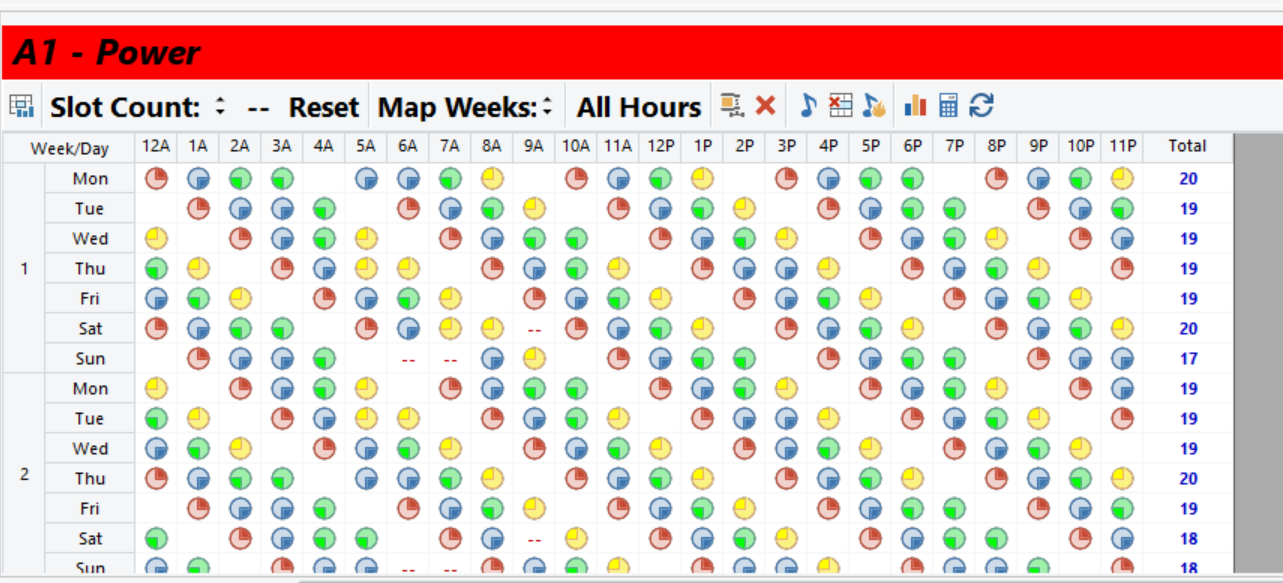
We can all agree this history graph reflects a mainstream, hyper turnover power category that looks spectacular inside the Turnover Analysis. To achieve such great rotation requires that a Power category bypass all category rules and have no specific category rules, so songs can plot in a natural order. Under Dataset, Schedule, Schedule Properties – you’ll also want a category like this to have a search depth of 1. The category order management (Dataset, Schedule, Schedule Order) should be switched to standard card file.

Now here’s where you zero in, you can create a numbering system that allows you to establish rotation position number for each song. It serves as a verification that the right things are happening as expected under the hood; furthermore, when a song is moved from Power Currents, a new song can replace that specific rotation position without disrupting the category’s natural turnover.
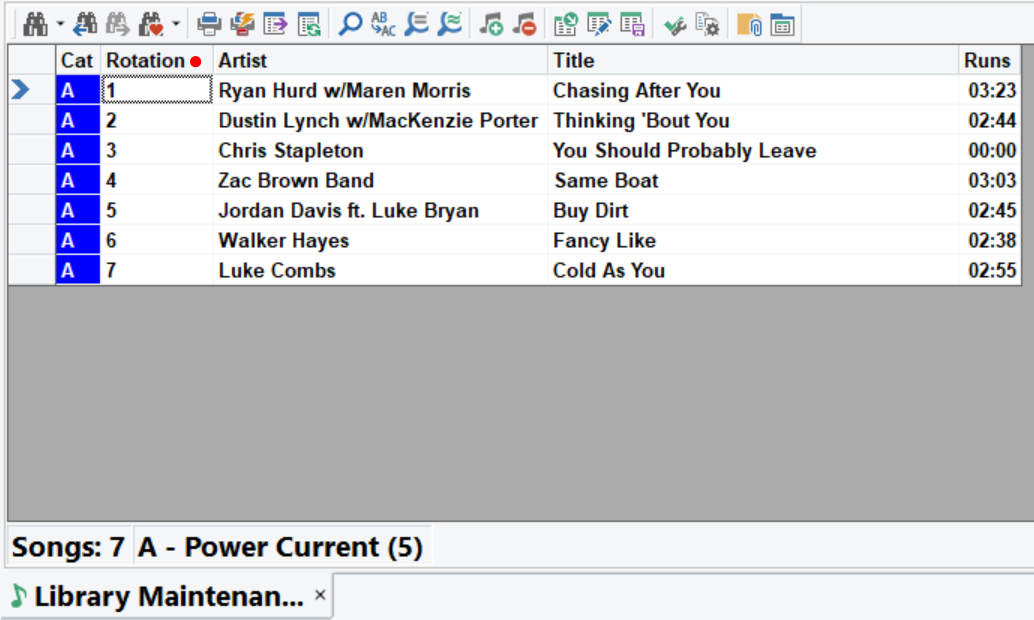
In this example, I’ve created a simple text field called “Rotation”, the songs in the category are numbered 1-7. Keep in mind this is a simple text field. There’s nothing dynamic or rule related to this field other than it allows the user to create a numbering system for these songs and create a desired stack order in the standard card file of this category. Remember, any number entered in this field will ‘travel’ with the song to any other category until the number data from that field is physically deleted or modified by the user.
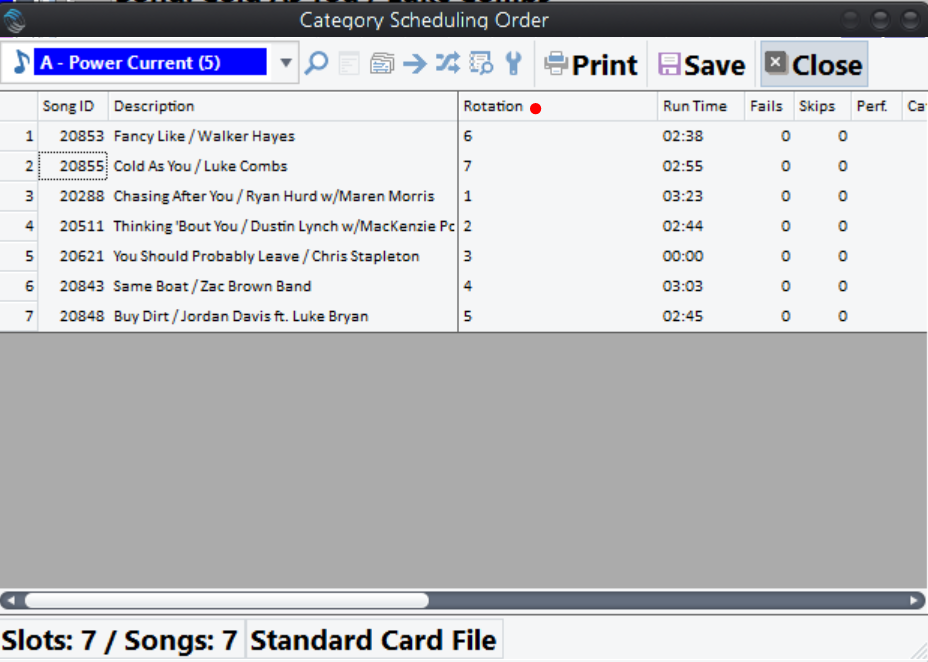
When you go to Dataset, Schedule, Schedule Order for the Power Current category, I can add a field to include the ‘Rotation’ field and I can put these songs in the desired schedule order and let it rip. A common misconception is that the schedule order is your desired rotation order and that’s not the case. The schedule order simply shows what song is next in the standard card file to schedule.

In the example above, the song at rotation position #6 is next up to schedule, in my desired rotation stack order. When a song is moved out of the category at any given rotation position, the incoming song can replace that rotation position in your desired stack order to prevent in wobbles in rotation.
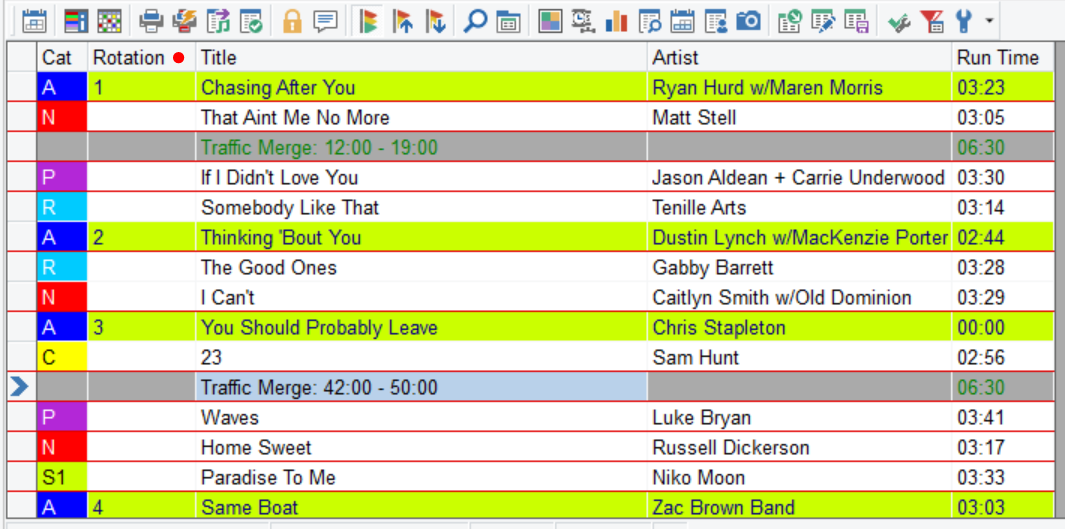
You can even add this “Rotation” field to your schedule editor to follow along to ensure your Powers are rotating in the standard card file order you designed through out the scheduled day.

For more on category order management or how to create a text field in your database, please reach out to your MusicMaster Music Scheduling Consultant.

Almost Perfect – Setting the Order for Your Rules

by Brian Wheeler

We’re dipping into the mailbag this time around. I had a client ask me, ‘should the rules in my rule tree be in any specific order?’ My answer is they don’t HAVE to be, but there are benefits to arranging your rules strategically.

For example, let’s say you’ve got a series of unbreakable rules enforced, and the first rule in the list is a stringent one…let’s say it’s Artist Separation. If MusicMaster tests a song for Artist Separation and the song in question breaks this unbreakable rule first, will MusicMaster keep testing or just move on? The answer is, MusicMaster will stop testing the remaining unbreakable rules and will move on to the next song in the search depth because this song can no longer be considered for the position. You’ve just saved your automatic scheduler the time and effort of testing the other rules. Of course, I have no way of quantifying how much time that saved, but efficiency is a good thing, right? My recommendation is to get those rules in an order that eliminates the most obvious songs right away.

Here’s another vote for organizing your rules by importance, this time involving breakable rules and Optimum Goals. If you’re using a combination of breakable rules and Optimum Goals, having your breakable rules in order of importance will affect how the Optimum Goals are approached. Optimum goals are applied to songs that are perfect (perfect in this case means no breakable or unbreakable rules are broken) UNLESS there are no perfect songs. Songs that break breakable rules aren’t perfect but can still be tested using a hierarchy and subsequently sent through your Optimum Goals for a clear-cut winner. Here’s a visual example with three breakable rules that are being tested.

Let’s say there are three songs for consideration that break no unbreakable rules, but each break one or more breakable rules. None of the songs are perfect, but they are all still eligible for scheduling.

Song One breaks the Play Offset Rule, which is first in the breakable rule hierarchy.

Song Two breaks only the Tempo 1 SLOW rule, which is second in the hierarchy.

Song Three breaks the same Tempo 1 SLOW rule, so these two songs have broken lesser breakable rules by virtue of hierarchy and now move on to the Optimum Goals tiebreaker. Song One will not move on for consideration in this position.

The order in which you’ve placed your breakable rules determines the importance of the rule when considering HOW imperfect the imperfect songs are. By placing your breakable rules in a pecking order, you’re communicating which rules should be considered when finding the song that’s closest to perfect amongst those that are breaking breakable rules. Optimum Goals will then step in and find the best remaining song from that elimination process.

Is this life and death stuff? No, of course not. We’re fortunate to be in an industry where decisions like this aren’t a matter of life and death. It’s not a crisis if you don’t have your rules organized perfectly. But if you want to dial in your rules just a little bit more, you could do worse than arranging your rules in an order that reflects the hierarchy in your head.

If you have any questions regarding Unbreakable rules, Breakable Rules, or Optimum Goals, feel free to reach out to your friendly neighborhood Music Scheduling Consultant to get more information.

  Quick Tip

Clock Printing Options

When it comes to printing your clocks, MusicMaster allows you to configure what you want included. You can choose what kinds of elements to print (song elements or non-song elements) as well as whether to include the pie chart or virtual shows. You can pick and choose any combination of these options to dial in your printing preferences. Should you not include one of the first three options, the report will indicate it is "Partial" at the top to remind you of your choices.

WDAV-FM Makes Classical Music History

MusicMaster client WDAV Classical Public Radio made history last week when they rose to the #1 spot in their Charlotte, NC market with a 6.4 share in the January ratings period. This is something no other classical radio station has acheived in the history of PPM audience measurement!

According to an announcement shared by PRPD president Abby Goldstein, "Many classical stations have seen record breaking audience numbers during the last two years, deepening the value and importance of this cultural asset for millions of Americans looking for solace and escape during harrowing times. We should take a moment to recognize the powerful message that WDAV's success sends about classical radio's unique place in our ecosystem and in our national culture."

Furthering this historic accomplishment is the knowledge that it was not achieved with the seemingly unlimited resources of a top ten market. Instead, WDAV is licensed to Davidson College, a mid-size operation in the mid-sized market of Charlotte (#22). Furthermore, this is not the first time WDAV has come out ahead of the pack. In 2016, they ranked #1 for all classical stations in the country with a quarter share of 3.6.

As Goldstein also shared: "There is a winning combination at WDAV - a deep commitment to their community PLUS the willingness to take risks and engage with partners in the creation of content." One example of their innovative and authentic community engagement is the "Noteworthy Project", a concert series created in parternship with the Fair Play Music Equity Initiative. It pairs gifted Black and brown artists from Charlotte’s music scene with classically trained musicians. As they describe it, "It’s what happens when jazz, R&B, hip-hop, pop, Latin, and soul meet classical."

WDAV Program Director Frank Dominguez shared with us, "We're delighted that so many radio listeners in the Charlotte region care about classical music, and turn to WDAV to experience it. Public media like WDAV isn't traditionally driven by the ratings, but this landmark does serve to demonstrate the impact we have on the community, and the special way in which we engage with our listeners. Thanks for the invaluable assistance MusicMaster provides in sharing classical music with our audience!" From all of us at MusicMaster, we congratulate the team at WDAV for your momentous achievement!

Welcome to MusicMaster!

Use the dropdown menu below to view a list of stations and locations.
Click a station on the list to visit its homepage and listen live!


Mike Love

President/Consultant/Brand Manager - Blue Tag Media, LLC

Mike Love, President and Founder of Blue Tag Media, LLC. has more than 40 years of progressively responsible experience, leading radio station format conversions, strategic marketing projects and start-up interventions for several major radio groups. He also has experience in sales and distribution of syndicated radio programming, consulting, social media development and marketing. Mike also has extensive experience in programming and management of 24/7 radio network formats, with local radio station management experience through joint ventures, affiliated sales and broadcast partnerships.

Mike has spent most of his adult life as the Owner of various local and global operated businesses, he’s been an SVP of Programming at the ABC Radio Network owned by Disney, he’s worked as an Independent Radio Consultant, On-Air Radio Personality and Radio Station Programmer, as well as a Team Leader in a variety of positions. Mike has a clear understanding of talent development and public relations, social consciousness, entrepreneurship, broadcasting, entertainment and product brand management.

Among his previous positions, Mike served as an On-Air Personality with iHeart’s Majic 108 FM, St. Louis & Power 99 FM, Philadelphia, Audacy’s WPGC-FM in Washington, DC, and Director of Programming at Inner-City Broadcasting in New York and South Carolina. He also served as a Cellular Marketing and Sales Director for Southwestern Bell Mobile Systems, in St. Louis, and as the Program Manager for Mix 97.1 Inc., St. Louis.

Mike Love holds a Degree in Mass Communication from Lincoln College, Lincoln, IL and holds a certification of Coaches Training from the Master Coach University.

As a fan of MusicMaster, Mike had this to say: "MusicMaster is my life. As a radio consultant, I’m tasked to do several things to help radio stations across the country win in ratings and local market success.

"I’ve spent the last 45 years of my life working daily to come up with winning formula’s that will compete successfully as an on-air talent to creating a programming mindset that gives listeners a steadfast environment they can depend on.

"The key to this success is obviously the music and how it’s projected for the listeners to enjoy without fatigue or a repetitiveness that will make them look for a better selection of programming from competing radio stations.

"It didn’t take long for an answer, once I chose MusicMaster as my go to scheduling system. MusicMaster immediately gave me the flexibility to schedule songs with the right tools I could depend on.

"MusicMaster made it easy for me to create separation of artists, song titles and categories that made the radio stations sound fresh and consistent throughout the day. As I’m scheduling the songs, MusicMaster let me quickly listen to those songs as I’m scheduling, to ensure the right versions are selected with no hassle of having several tabs being opened to get the job done fast.

"MusicMaster is very intuitive and easy on the eyes, staring at computer screens all day can be fatiguing which leads to frustration and sloppy results!

"Finally, MusicMaster is a dream come true with its genius team of customer service representatives, available by phone or email quickly for any questions or concerns you may have with getting a log scheduled and, on the air, NOW!"

MusicMaster, Inc.
MusicMaster.com

8700 Stonebrook Pkwy, #1167
Frisco, TX 75034
sales@musicmaster.com
469.717.0100