"How To Play Two More Songs EVERY HOUR"
In each newsletter, we present a guest article from one of our MusicMaster ProTeam consultants. This month, Tracy Johnson of Tracy Johnson Media Group shares ways to win the "More Music" game with a little editing magic.
The battle over most music rages, though today's competition comes from new
technology as much (or more) than from other radio stations. If programmers
could find room to play 2 more songs every hour, it would be an advantage,
wouldn't it?
But wait a minute. You're thinking that there's no chance the suits will reduce
the commercial policy to make this possible. That's right. It's not going to
happen. But every station can play two more songs every hour, even without a
change in commercial load.
Let's talk about why this is important, even if there's not another station
competing for being the "most music" image. It's because of the audience's
shrinking attention span.
Listeners are impatient. They have choices. They're quick to tune out negatives.
And anything that fails to engage them is a negative. Every programmer knows
that intuitively, but most never do anything about it.
The music industry has adjusted to this trend. The formula for producing a hit
song has changed.
The Hit Music Formula
For decades, the formula for a hit was something like this:
- An instrumental song intro, usually 10-25 seconds.
- The hook (chorus) of the song comes in around :50 to 1:10.
- That sing-along hook repeats 3-4 times.
- An instrumental bridge comes in at the 2/3-3/4 point, usually lasting 30-45
seconds.
- Total song length of the typical hit song: 3:30 to 4:20.
But this has all changed. The new formula is:
- Little to no song intro. Songs start quickly, leading with vocals.
- The hook hits quickly, usually In the first 10-40 seconds. Sometimes it's
immediate.
- Repeatable, sing-along parts of the song (the hook) repeats far more
frequently throughout the song.
- Instrumental bridges are shorter. In some cases, they're eliminated.
- Multiple hooks appear in the same song.
- Total song length overall is shorter.
Music production has changed, and it’s time radio stations change with it.
How to Win a "Most Music" Image
It's not radio's job to present music as a service to the music industry.
Sorry if that offends a sense of music integrity, but I'm more interested in using
music to build a branded product that adds listening. You too? Good.
Here's how to win the most music image and create a great sounding radio
station at the same time:
Create Custom Edits
Every song in the music library should be edited. Don't just choose the best
version or edits of songs provided by labels. Make your own. Target
trimming every song by 30 seconds (or more).
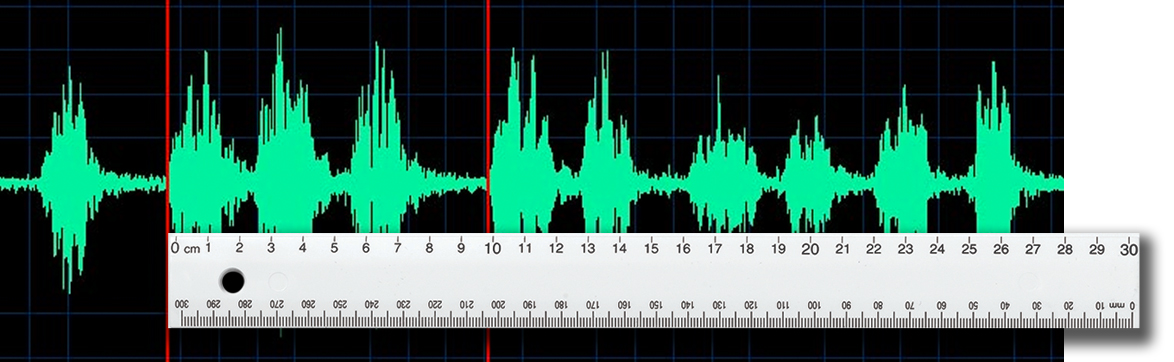
Start with trimming or eliminating the instrumental bridge. There are some
instances where the bridge is an integral part of the song. Don't mess with those. But most can be eliminated without missing anything. In other words,
search for parts of songs that won't be missed.
Another way to shorten songs is editing the ends of songs. Some songs (though
not as many as in the past) have an unusually long fade at the end. It goes on
and on, repeating the same lyrics before ending. For those songs, edit
redundant lyrics to get to the song fade sooner.
Set a target length for most songs. Try to get each song to 3:00-3:20, if possible.
Some will be shorter, and some may be a little longer. But try to go for an
average length around 3:10.
Increase the Tempo
In past eras, stations routinely sped up their music. If you do it right, those hit
songs will sound brighter and better on your station.
Speed up each song by 2-3% but do so without changing the song's pitch.
There should be a setting in the editing software that makes this easy. Or the
automation system may have a setting that does it automatically.
2-3% is a general target. Some songs can be sped up a little more, but be sure
that it's subtle, not obvious. The goal is to be faster and brighter, not rushed and
cartoon-ish.
Most Music: How Much Will You Play?
The result of editing songs doesn't seem like much at first glance. But do the
math.
If a station normally plays 13 songs an hour, shaving 30 seconds from each
song creates 6:30 of time for additional titles.
If the average song length is 3:15, that’s two more songs per hour.
Now that station plays 15 songs an hour. That's a 15% increase in number of
songs played.
Speeding each song by 3% saves another 6 seconds per song. That saves
another 90 seconds per hour. It's possible to squeeze in a 16th song in many
hours!
Think about the overall impact for music quantity. In a 24-hour day, you're
playing 72 additional songs. 72! Every day. And that's without reducing the
commercial inventory.
What Does it Sound Like?
The song count increase is fantastic. But the impact on a station's sound is even
more impressive.
You’ll sound faster. The station will be more exciting. There’s more action, more
movement and more momentum on the station. It just sounds more interesting.
More branding opportunities. Having more songs generates more branding
opportunities between the music. Note: It also sounds great to work in cold
segues in the clock.
Dominate music quantity. If there's a music quantity battle in the market, the
music comparison between stations is not even close. Stop comparing minutes
of music and challenge them on music quantity.
Tighter rotations. With more songs playing, categories will turn over faster.
Don't increase the music library. Let the rotations tighten. This adds TSL by
increasing tune in occasions.
"Most Music" Case Studies
A few stations have experimented with an exaggerated version of this concept.
The most notable was NewCap’s CHR station in Calgary. They went to an
extreme, editing titles to 2 minute versions.
This CHR on Steroids approach didn’t work, prompting a change after a few
months. The concept was good, but as with most things (politics, religion,
dieting, etc.), problems begin when execution is extreme.
A controlled approach is more appropriate. I've done this with several client
stations, and the results are extraordinary.
Execution Notes
Editing music is an art, so an artist should be in charge of producing the edited
songs. The producer must understand music so the edits are in rhythm, on the
beat and at the end of a bar of music. If nobody on your staff fits this
description, hire someone to do it for you. Contact the music or technology
departments at local colleges to find candidates.
Some programmers are reluctant to change their station for this approach, but
like it for the morning show. This works well to maintain a music presence and
allow personalities more room to perform. Even if just current and recurrent
songs are edited, it can help get more songs and more personality on the show.
Conclusion
For best results, launch this project with every song in the library. But it doesn't
have to happen all at once.
Start by trying it with a few songs in a secondary category or do it with all new
songs added to the playlist. These songs don’t test as well, so it's a good idea
to get through them faster anyway.
Do it without telling staff members. See if anyone notices. My guess is they
won’t. Just be sure you don’t tell the GM or Sales Manager, because they’ll have
some ideas for how to fill the time you save each hour :).
 Want more advice like this?
 Read more about Tracy and his services on our
ProTeam page or on Tracy's website:
TJohnsonMediaGroup.com. Or contact Tracy directly at (858) 472-3546 or Tracy@TJohnsonMediaGroup.com.