February 2023

Meet Us at Country Radio Seminar 2023

This month, we're very excited to meet in Nashville once again for the Country Radio Seminar. From March 13 - 15, country radio broadcasters from all over will gather for three days of informative sessions, networking opportunities, and of course - a whole lot of great music! If you plan to be there, look for the MusicMaster Meeting Point just next to the upstairs Registration area. Stop by and say hello to all your MusicMaster friends, from Dave Tyler and Amanda Bender to the whole Knapp gang - Joe, Melanie, Laurie, and Brian. We'd love to connect with you, so if you plan to be there, drop us a line at info@musicmaster.com to let us know. See you there!

Radiodays Europe in Prague March 26 - 28

In the first month of spring, Radiodays Europe will take place in an exceptionally interesting city whose historic center is a UNESCO World Heritage Site. Prague is one of the oldest European cities and has a long brewing tradition as well as radio history. MusicMaster will be proudly represented by its international distributor ON AIR and the European Partner Network. You can meet Sven and Ellen at booth number 20 near the entrance elevator.

And if you want to add a unique Prague experience to your stay, join us in the early evening of Monday 27th, just before the official Radiodays party. We invite you to a very special place for a freshly brewed Pivo and some delicious snacks. Curious? Contact us at: radiodays@onair.de

Do You Want Optimum Exposure?

by Chris Hulsether

What if I told you MusicMaster can help you spread out the airplay of your songs or artists throughout your day and cut down any perception you play the same songs in the same hour?

Optimum Goal Scheduling is a unique and exclusive concept in MusicMaster. We like to say it’s a tie breaker. When the Automatic Scheduler has two or more songs that clear all of the existing rules you set up, we call them “perfect songs”. A perfect song can be one that passes all of the breakable and unbreakable rules. Or, in the less common case where all the songs in the search depth fail at least one breakable rule, MusicMaster will apply the tie breaker to the songs that all failed the lowest priority breakable rule. (Songs that fail unbreakable rules are always skipped).

Optimum Goal Scheduling will score songs based on the various Goals you’ve applied and tell MusicMaster which perfect song it should choose. An example is choosing the song that meets the Goal for the most rested song among all the available perfect songs.

To learn more about Optimum Goals read this Blog: https://musicmaster.com/?p=1587 See this quick walkthrough video on how to set them up here: https://youtu.be/7ZmUchZsUow

I want to talk about Optimum Exposure Goals and what those goals will do for you when you activate them. The exposure goals will look at the available songs and choose the one that has been exposed or played the most in other hours, shifts, quarter hours, etc. before scheduling in the same spot. This gives you a better rotation of your category and helps prevent the perception that you play the same songs at the same time all the time. You will need to decide what exposure goal makes sense for your database.

To learn more about your Hour Exposure you can read this excellent Blog about Hour Exposure in your database here: https://musicmaster.com/?p=7494

Let’s look at the options:

Optimum Hour Exposure

This Goal will favor the song that has played in as many of the other 23 hours of the day as possible before playing again in the same hour. For example, let’s say the scheduler is trying to break the tie between two songs for a 2pm slot. Since the last time Song A played at 2pm, it has played in six other hours. Since the last time Song B played at 2pm, it has only played in two other hours. You’d want to give Song B a chance to play in more different hours before you play it again at 2pm. So Song A would be favored, because it’s played in more different hours before returning to the same hour and has the best Hour Exposure of the two.

Note that it is important that your Purge History settings have enough plays to test. This Goal would need a minimum of 23 plays to work to its fullest.

To find Purge History go to Dataset/Schedule/Purge History

Optimum Shift Exposure

This Goal favors a song that has played in as many of your other shifts (as defined in the Shift Editor) as possible. To find your Shift Editor, go to Dataset/Schedule/Shift Editor.

There, you can customize the shifts. You can match them with your on air shows or set them up as you define different parts of the day.

Optimum Quarter-Hour Exposure

This Goal favors the song that has played in as many of the other quarter hours as possible before playing again in the same one. This only makes sense if the category you schedule the song in is located in different quarter hours in your clocks. If your D category is always at :18 after the hour and not anywhere else the clocks, then those songs in D will not get exposed to other quarter hours anyway.

Optimum Keyword Rest

This refers to the ideal rest of keywords such as Artist or Title Keywords. A good example would be favoring the song whose artist has rested closest to the ideal separation calculated for that artist.

Optimum Keyword Hour Exposure

This favors the keyword that has played in as many of the other 23 hours of the day as possible. This logic is similar to the Hour Exposure goal described above. Let’s say MusicMaster is scheduling a song at 2pm and it has a choice between a song with a Brittany Spears Artist Keyword and one with The Backstreet Boys Artist Keyword. The goal scheduler will see which keyword was used in more different hours first before playing again at 2pm. If the Brittany Keyword played in 4 different hours since it last played at 2pm, and The Backstreet Boys keyword played in 2 different hours since it last played at 2pm, the goal would choose Brittany. That way the Backstreet Boys would have a chance to be exposed to more different hours before being scheduled in the 2pm hour a second time.

Optimum Keyword Shift Exposure

The keyword that has played in as many of your other shifts as defined in the Shift Editor as possible. Using the Brittany/Backstreet Boys Artist Keyword example, If you have 6 different shifts set up throughout the the day, it’s 2pm, and Brittany’s keyword played in 3 different shifts and The Backstreet Boys’s keyword has only played in 2 different shifts since the last time Brittany and The Backstreet Boys were scheduled in this (2pm) shift, the goal will schedule Brittany because The Backstreet Boys hasn’t been exposed to more different shifts before scheduling in the same shift as your 2pm shift.

Optimum Keyword Qtr-Hour Exposure

This favors the keyword that has played in as many of the other quarter hours as possible. Let’s say at 2:05pm, Brittany’s keyword has been exposed to 3 different quarter hours before being considered again in that first quarter hour (00:00-15:00). The Backstreet Boys keyword has only been exposed in 2 different quarter hours before trying to schedule at 2:05pm, Brittany gets scheduled because her keyword has been exposed to more different quarter hours.

Optimum Radial Spread
Another related Goal worth mentioning here is Optimum Radial Spread. This goal actually takes both hour exposure and time-period exposure into account. The Shift Exposure goal only looks at one set of time periods; your assigned shifts. Radial Spread looks at a collapsing window of overlapping time periods, which can produce an even better result. Any song with a low score in either Hour Exposure or Shift Exposure will also have a low score in Radial Spread, so you can use this single Goal to combine those forces. For more on Optimum Radial Spread, check out this article: https://musicmaster.com/?p=3481

As a final note, the Optimum Goal scheduling will never prevent a song from scheduling. That’s where your rules come into play first. You also want to be careful on how many Goals you set up, as it can slow down the automatic scheduler because it has more calculations to do when scheduling. However, you’ll make up some of that time in less time spent editing, since the log will be closer to the intuitive sound goals you have for your station.

If you have more questions, reach out to your Music Scheduling Consultant to assist you.

Does Size Matter?

by Dave Tyler

By Dave Tyler

I get asked quite often about how large or small a music database should be for a successful station. It is an interesting and very broad question for sure. The easy answer is: I don’t know, what are you trying to accomplish? In this article, we will start from the science of creating a database playlist size and wind our way to a more philosophical look at having a small or large playlist.

A hot CHR might have a very small and tight database, while a streamer or local station might have a very broad playlist, and a Classical programmer may have 200,000+ pieces easily. There is no right or wrong size, only “What size most efficiently accomplishes your sound goals?”

Let’s get to the foundation of any station: Categories, Category Song Counts and Clock calls. These three things determine our “Turnover” or how long or soon it takes for the category to play each song once before the same songs play again on the schedule.

Let’s break it down further. When creating categories, you can think of them as folders where you store songs. Keep in mind that the categories you will use in your “Active” clocks/grids need to be thoughtfully considered because the amount of songs (Song Count) directly affects how quickly a song will play, rest and come back to play again, or turnover.

Clock calls are the final deciding factor on how Turnover will play out. As a simple example, if I have a HOT category with 6 songs in it (Song Count) and that category is used in each clock one time (Clock Calls) then my turnover will be every 6 hours. As another example, if there were 24 songs in the category and the clock called for that category once per hour, it would take 24 hours to go through the entire category and in other words, each song would play would play once every 24 hours.

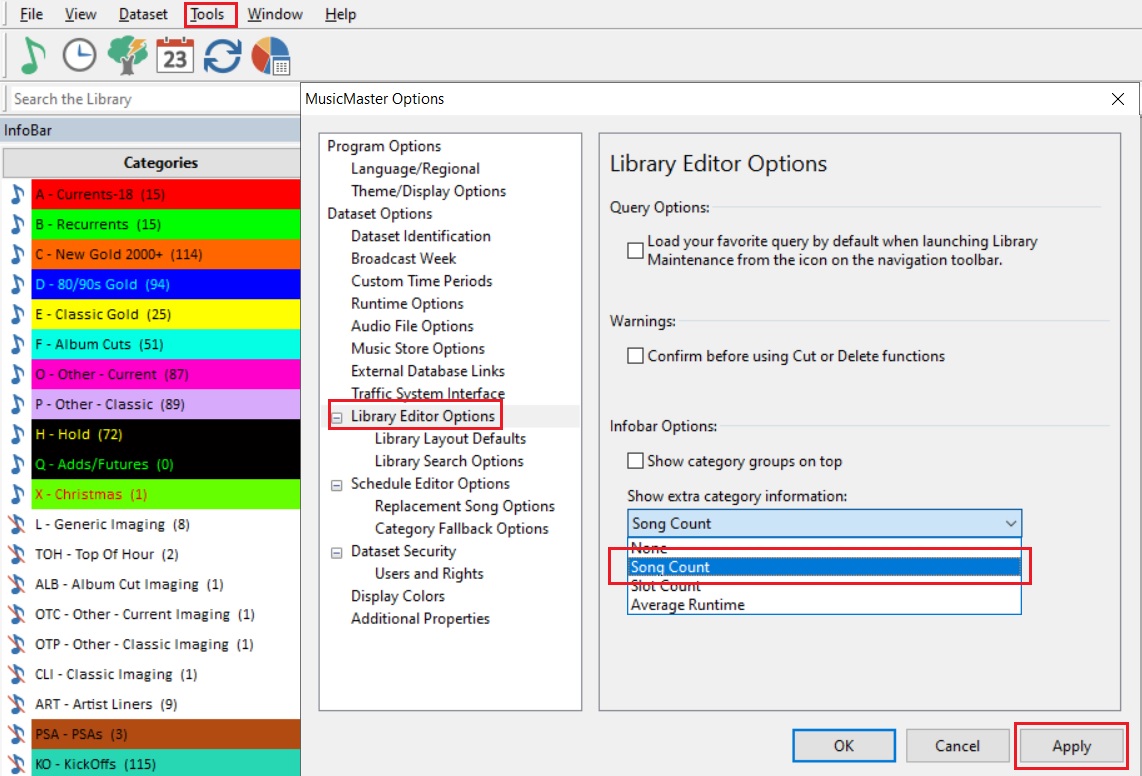
By the way, did you know you can see your Song Count without having to open the category? It is easy to set up. Go to Tools/Options/Library Editor Options and choose “Song Count” from Info Bar Options. (Pic below)
Graphical user interface, application
    
    Description automatically generated

Going back to the start of Top 40, could you imagine having a playlist of just 40 songs? That is a tight rotation, but is it wrong? Again, there’s no right answer but if the goal was to play the newest songs that folks wanted to hear the most, then it is spot on. Of course, once a song falls off the list well…people still want to hear it sometimes. That’s the purpose of Recurrent and Gold categories. So, a small fast rotating “Currents” category(s) supported by larger but carefully curated, slower turning over Recurrent/Gold categories made a lot of sense. Give the people what they want, because like the old saying goes “Every song is a three minute opportunity to either keep a listener or have them switch to your competition.”

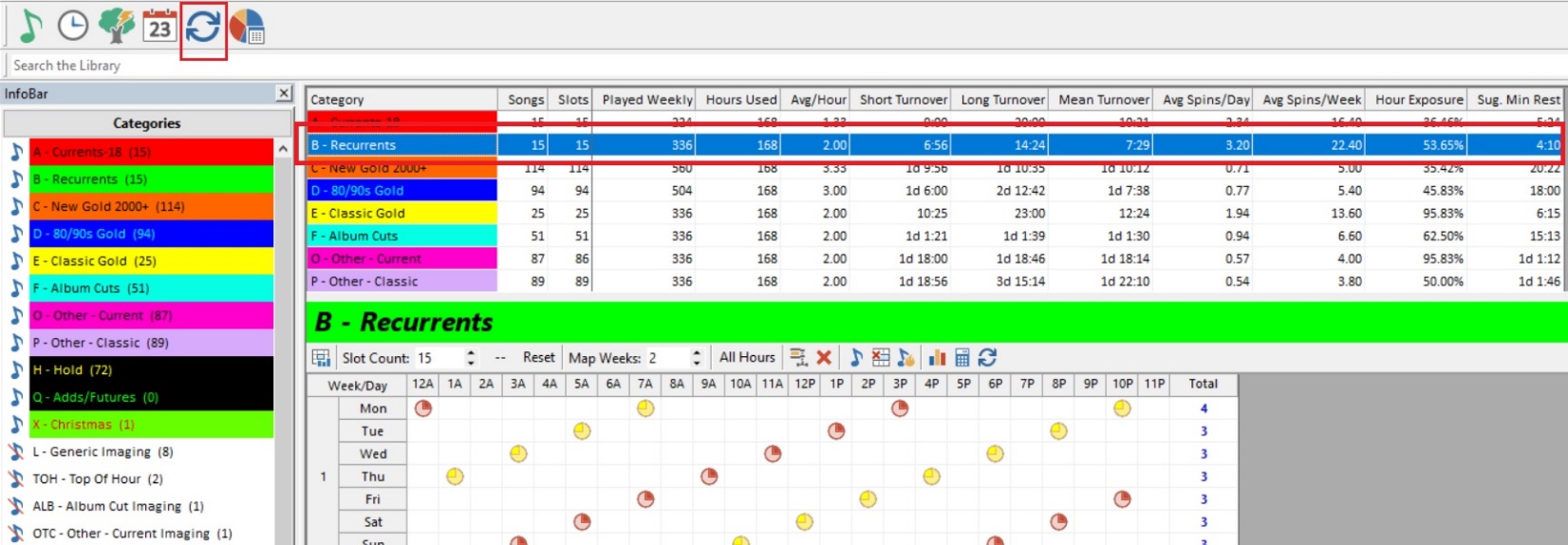
In MusicMaster, we have a couple of amazing tools that will show you what your turnover actually looks like. In the main toolbar, click on that icon with the two blue arrows in a circle…that is Turnover Analysis. When you click on this you get a full suite of information about how your categories plot, turnover, and move. In the example below, looking at the Recurrent category for this database, you can see there are 15 songs in the category playing an average of two per hour. The Short Turnover for this category is 6:56, the Long 14:24 and the Mean or Average is 7:29. Below that is a chart that gives an example of how one song in that category, not a specific song but how any song in that category would move. This is before rules come into play. Here you can see how the larger categories, even those with more Clock Calls, turnover slower because the song count is much higher.
A picture containing calendar
    
    Description automatically generated

Now let’s look at that New Gold 2000+ category. It shows an average of 3.33 plays per hour. How can that be? Well if we click on the Format Clock Category Usage button (Clock Calls) we can see that they never actually have three calls for this category in any hour, it’s either two or four. But this averages out to 3.33. This too is a good place to gather up information when trying to determine where you want to be, what you want turnover to be, and how many songs vs how many clock calls will get you there. In short: to get a category to turnover faster, you can either have a smaller category or more clock calls. To get a category to turnover slower, either make it larger, or use it less often in the clock. It’s a balancing act to get you where you want to be!

Calendar
    
    Description automatically generated

Now let’s go to the philosophical side of things. How much music is too much music? Should I only schedule songs that are released by the labels and adhere to the Industry charts? What if I want to play deeper cuts off an album, would that make sense? Heck in the 70s with FM radio starting to get its feet under it, there was an entire format dedicated to that! AOR Album Oriented Rock! It’s one of the most well-known pieces of rock trivia that Led Zeppelin’s “Stairway To Heaven” was NEVER released as a single but it is arguably their most popular song by a long way and had us dashboard drumming years before “In The Air Tonight” or “Jack and Diane”! Why was AOR successful for it’s time? Perhaps we listened to music differently. When I would get an album I would go home, put headphones on, pull the liner notes or lyrics out, and listen to the whole album. Because a lot of people my age did that, maybe folks kinda knew the music already. We had heard the entire piece of work, not just the songs that would become singles. As a life long radio guy, I think I can listen to any album from any format that I’ve played over the years and find at least one song that I cannot believe never got radio play. I bet you can too!

The way we listen has changed since the iPod and then Spotify and Amazon etc. Like most radio people, my musical interests and likes are broad. I have playlists that include everything from Patti Page to Powerman 5000 (NOT on the same list!) and there is a LOT in between those two! I am a Singer/Songwriter ballad junkie and I have a cousin who is constantly sending me the greatest acoustic performances by people you’ve never heard of. Dylan, Carole King, John Prine level songwriting that most will never hear.

What are the main formats out there? Urban, CHR, Country, AC, Classical, Jazz and Rock. But then, think of all of the formats that have branched from these…the “Alt” formats of each mentioned above that were created to introduce us to folks outside the box. Heck, Americana may be the Godfather of these formats. It might be fair to say that a lot of these are run by Universities that have funding to support a lesser known more ambitious format, as opposed to having to serve the masses and hustle for advertising dollars, and maybe for that reason can take the risk.

I think music lovers/listeners are much more open to new sounds than ever before and are willing to give deeper, unknown artists/songs a chance. At the end of the day, we can ask our phones to play any song we want to hear on the planet when we tire of the unknown and want to hop back into our comfy place. Some stations with tight playlists have feature programming later at night or on the weekends that might show off some of these incredible fringe performances and the people who are interested can tune in at this specific time.

I work frequently with a Programmer who believes 300 actively rotating songs is the max for a Country station and 200 would even be better and 150 better still. On the other side of things, I have a client with a massive library that literally has every song from the artists they play. All the hits and all of the album cuts, and they rotate equally with the goal being that every song will play before the list starts over. Which one of these programmers is correct? To bring it full circle, they both are if they are accomplishing their goals. One may be feeding listeners nothing but the hits while the other aspires to broaden their listeners by presenting tunes they likely have not heard before or going for variety. Goals being met = success, whatever those individual goals may be.

A Streamer might focus on a feel or vibe while a terrestrial station picks a format and does just that and keeps it simple but good. A “Hobbyist” on a stream has the incredible freedom to play anything they want, while the PD of several stations has a bottom line because this is a business. I run a pretty tight playlist but I am also a big fan of my “Variety” or “Oh Wow” category of songs that go pretty deep but are all well known songs that just kind of went away. I use it sparingly but love the idea of a listener going “Dang I forgot about that song!”

At the end of the day, the playlist size that is right for you is up to you and will likely change as you change. From huge playlists that take months to turnover to tight lists that keep the hits in the ears of your fans…we can help you with both. Just let your Music Scheduling Consultant know what you are looking to do and we’ll work with you to make it happen. That great radio in your head can come out of the speakers. Let’s get to work!

  Quick Tip

Schedule Editor Fail Alerts

As you are scrolling through your log while editing, you can get a quick visual cue if a song fails a rule by turning on Fail Alerts. This adds a box which will flash with a green, yellow, or red color depending on whether the song passes all the rules, fails an breakable rule, or fails an unbreakable rule. The Fail Alert can be its own panel, or for a more compact look, you can add it to your Results Bar at the bottom of your Schedule Editor. Look for the drop-down arrow on the far right side of the Schedule Editor toolbar. From there, you can check on Fail Alert to open it as its own panel. Or, if you want to add it to the Results Bar, make sure that Results Bar is checked on. Now, right-click on the Results Bar and select Customize. From there, you can add all sorts of helpful widgets to help you review the log as you edit, including Song: Fail Alerts.

Welcome to MusicMaster!

Use the dropdown menu below to view a list of stations and locations.
Click a station on the list to visit its homepage and listen live!


Local Radio Networks

Local Radio Networks (LRN) provides 24/7 music radio programming with national talent and custom content. They currently offer 18 different music formats including Soft Adult Contemporary, Superstar Country, Classic Rock Pure, Hip-Hop Urban, Adult Standards, and everything in between! Since 2020, the team at LRN have used MusicMaster Client-Server to manage their Enterprise database, program their various formats, and deliver content to their network of some 700 affiliates. We caught up with VP/Programming Chris Reeves and Program Director Jonathon Steele to talk about their experiences with MusicMster.

Jonathon shared: "I’ve been in Network radio for over 30 years, and here at Local Radio Networks, we offer 18 different formats, so MusicMaster helps with managing all the various databases. We use the Music Master Client Server Edition. The customer service at Music Master has always been friendly and helpful whenever I have questions about changing or implementing new elements or features. I also really enjoy the Enterprise database, as it allows us to add songs into the system and distribute them to individual or multiple databases with just a few mouse clicks. The Enterprise system is a true timesaver compared to other programs I’ve used in the past."

Chris added: "As LRN continues to grow its affiliate list to nearly 700 radio stations and now 18 formats, MusicMaster has been a great partner along the way. The way we deliver our music logs to our affiliates, with the various automation systems we integrate with, is truly unique to the 24/7 network radio industry. With that, MusicMaster has been an awesome partner to work with, and their support team has been top-notch while developing and maintaining our databases. Thank you for your help and support as we continue to grow our business."

MusicMaster, Inc.
MusicMaster.com

8700 Stonebrook Pkwy, #1167
Frisco, TX 75034
sales@musicmaster.com
469.717.0100