December 2022

Happy Holidays from all of us at MusicMaster! We thank you all for making MusicMaster a part of your success, and sharing your enthusiasm and passion for radio with us. This year has been an exciting one! We've expanded our Support and Development Teams, released our latest Pro Version 8 (and with it, launched our integrated Music Store), we've brought even more clients on board to upgrade their programming operations with our Client-Server platform, and welcomed just over 150 new stations onto MusicMaster. As the dust began to settle from the pandemic years, we happily returned to seeing our clients in person at trade shows and Genius Days, and look forward to doing even more of this in the New Year. We wish you and your families a safe, healthy and joyous holiday season and a Happy New Year!

Holiday Support Information

As a reminder, the MusicMaster support team will be available throughout the holiday season to assist you if needed. In the US, Canada and Mexico, call our Support Hotline any time at 262-825-4000 or e-mail support@musicmaster.com. The International support center can be reached on weekdays as usual at +49 30 859 559 55 and support@mmwinisc.com. On the holiday itself, the international support team is also available for emergencies on the hotline numbers given above.

MusicMaster Names Jerry Parker as Director of Operations

MusicMaster is pleased to announce that Jerry Parker will serve as our new Director of Operations. Jerry joined MusicMaster’s development team in 2018 as the Director of Technical Services. In addition to his expertise in IT/Engineering, Jerry also has a background in leadership, strategy, and operations. With this combination of skills, Jerry has since become key contributor, not just in our development team, but across the entire company.

Laurie Knapp, MusicMaster CEO shared, “Since Day One, Jerry has always been enthusiastic about bringing great ideas to the table and looking for opportunities to enhance our operations. He is someone who takes the success of our clients and our team personally, and when set loose on a mission, always takes it to a level that surpasses expectations. Over the years, his fingerprints have been on more and more of our successes, and he has lent a critical voice and perspective to our leadership team. We are pleased to recognize Jerry’s contributions by naming him MusicMaster Director of Operations.”

A seasoned technical professional with over 30 years in the industry, Jerry started his career in technical services as an engineer in 1986 and served several companies such as Creative Data Planning, Bay Broadcasting, and Reservation Ranch. Focusing on strategic business development plans, he helped grow businesses by implementing technological platforms and equipment strategies to improve business efficiency. In 1999, he joined the executive team at Jones Radio Networks as Director of Engineering and managed their Day-Part and distribution technical platforms, delivering programming such as Delilah, Lia, Marie Osmond, and other talent to affiliate stations across the U.S. and Canada.

Prior to joining MusicMaster in 2018, Jerry served as Vice President of Operations at Presslaff Interactive Revenue (PIR) and was directly responsible for their Dat-e-Base suite of applications for Radio, Television and Print industries. Jerry provided operational strategies, goals, and action plans with concentrations in applications, database development, server farms, and IT support teams. Under Jerry's leadership, PIR grew to become one of the largest providers of First-Person Databases and Marketing Strategies providing services to Media Businesses worldwide.

Since joining MusicMaster as Director of Technical Services in 2018, Jerry has learned the inner workings and technical details of MusicMaster Pro and CS and his deep understanding of IT, networking and database technology has been extremely valuable in improving our products and training our support staff to better handle customer issues that require a solid understanding of information technology. He has helped to improve our internal support documentation and knowledgebase to better educate our MSCs. Jerry took responsibility for our trade show booth displays and our internal testing computer systems.

With his expertise in both technical operations and strategic project management, Jerry was a perfect fit to lead MusicMaster clients to success when implementing our Client-Server (CS) product. His responsibilities span all aspects of this process, from providing guidance on the smallest technical intricacies to helping oversee all the moving parts. He has been a valuable resource in helping our clients go through the important process of enhancing their data infrastructure, reducing redundancies and vulnerabilities, and streamlining their programming operations.

Jerry also acts as a liaison with our Nexus Integrated partners - third-party vendors who have developed enhanced real-time integration with MusicMaster through our Nexus API.

Over the past year, Jerry’s role has expanded even further to include managing our Support Teams, where he has implemented new systems and procedures to help the team become even more efficient and effective, thus providing a better support experience for our customers.

Jerry shared, “I'm humbled and honored to be considered such an important part of MusicMaster, and I'm looking forward to helping insure our continued leadership and excellence with our products, customers, and radio community!”

New in Version 8: Library Highlights

by Jesus Rodriguez

You asked for it and it is now here in Version 8! Over the years, many have asked about the ability to expand the Highlight feature beyond the schedule editor.
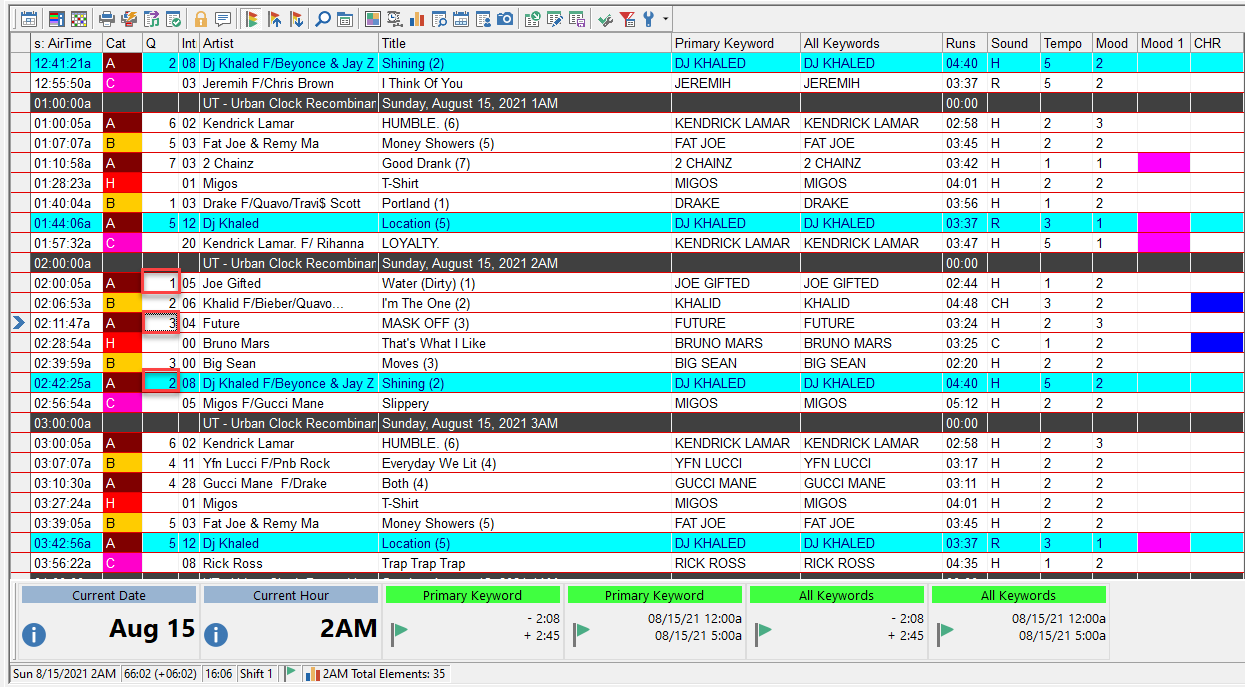
Highlights in the schedule editor allow you to see at a glance where certain characteristics are in your log without having to read a field and translate the information. These reasons are all customizable to your preference for almost any field like artist, tempo, mood, genre, etc. In the example above you can see that I have some pink and some blue highlight fields. One represents Mood 1 and the other CHR. I can quickly see I have two Mood 1 back-to-back calling my attention to address it. Many users have enjoyed this ability to quickly see the balance of the music and imaging and now you can use highlights in your library too.
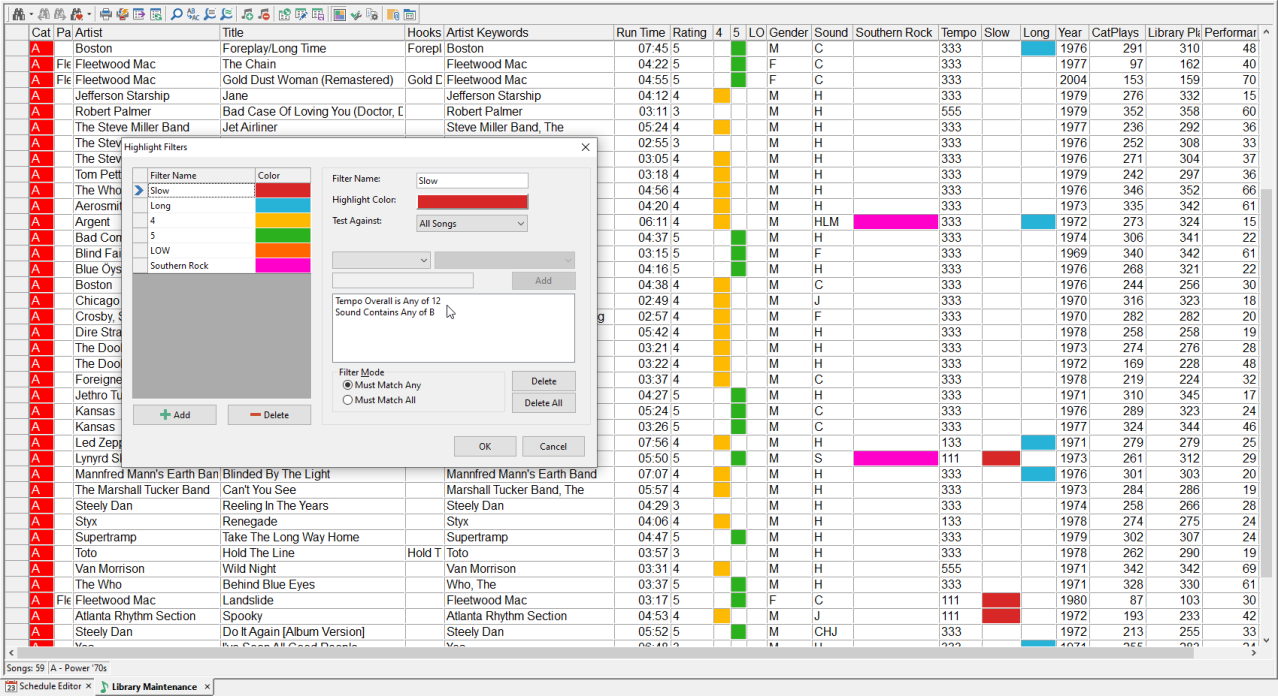
In the example above there are a few for specific tempo, genre, and length. Once created and added to the layout, you can get a bird’s eye view of those important fields. For instance, if I was told orange is bad and green is good, I could see that my category is heavy with orange (4) and I need more 5 (green) songs to balance it out.

Highlights are really just a query, so can be created for one or more fields with any color of your preference. You may want orange to represent tempo 4 as shown above while another color may represent a combination of tempo 4, Female, 80s hair band, and ballad.

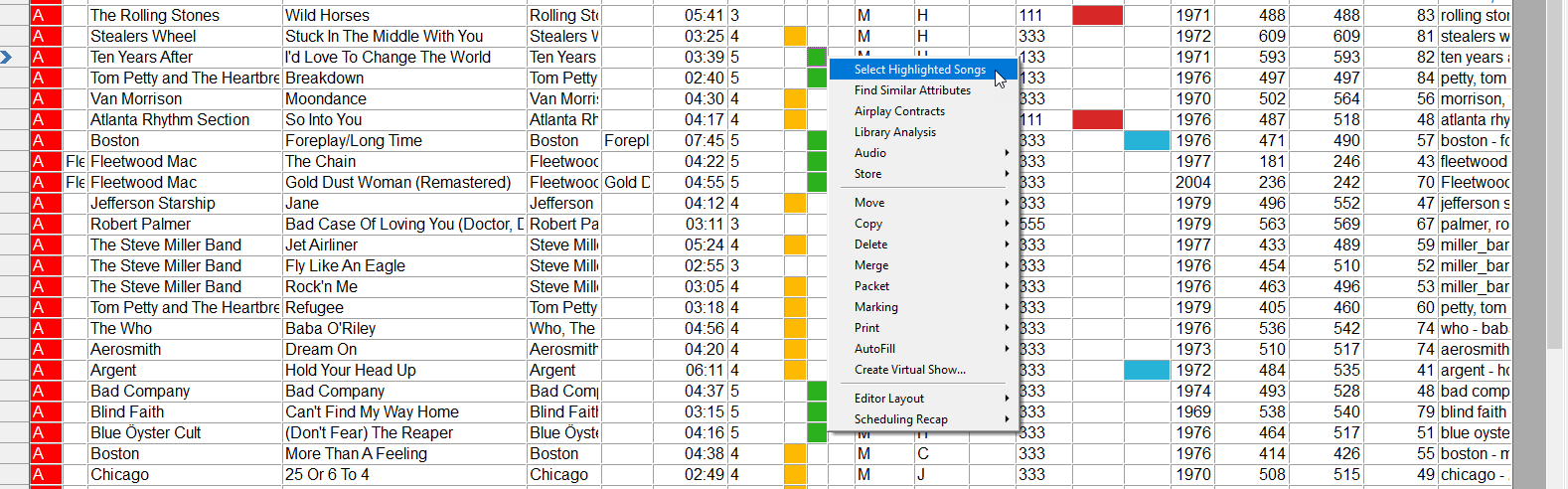
Two of the best parts of this feature are that you can right click on the highlight then select all songs that match that color so you can then make an easy copy, move to a category or even delete that selected batch.
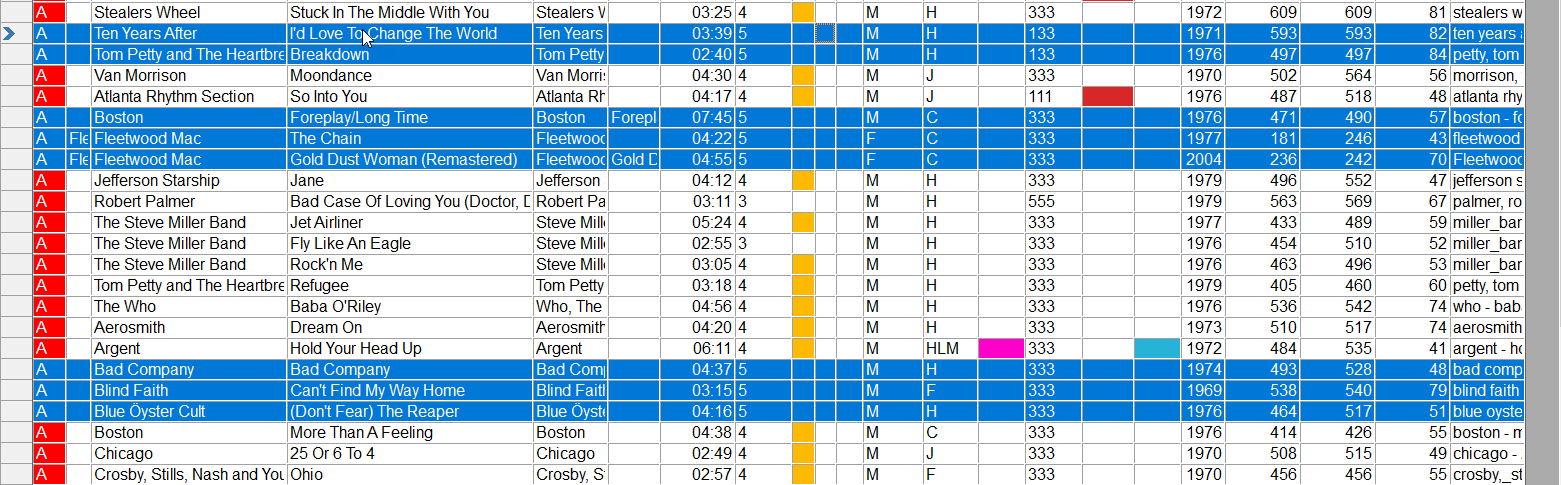
Secondly, once you create your highlight in either the schedule editor or the library, the highlights will exist in both parts of MusicMaster. You do not need to recreate them in each area, they will be available in both places.

The sky is the limit with highlights! We hope you enjoy this new feature and we look forward to seeing how creative you can get when using highlights.

Contact your Music Scheduling Consultant if you have any questions.

Customizing Your Hour or Sweep Targets

by Dave Tyler

There are all kinds of ways to control the sound of your radio station. Today I want to use a specific Attribute field that I have for “Era”. This station has songs from the 70s to today. I have my library’s songs coded for this and although it has songs from all Eras I want it to lean late 90s-2000s. In my example I want to use the Hour Target rule to nudge MusicMaster to schedule to my preference. When I add the Hour Target rule from my Attribute Field Rules/Era folder, the meter I see goes from 1-9 which is a bit confusing. Mostly because my 1 code is actually the code for my 2020+ songs so this meter goes from 2022+ to 1970s, 1980s, 1990s and 2000s. Out of order and hard to understand if I want to use this rule.

The cause of this is the Value field in the Attribute Code editor for Era. If I change the value to match the Era names then you will see the meter becomes much more understandable and easier to use.

MusicMaster gives you the power to customize just about everything in your database and this is one easy way to get more of the sound you want and a view that makes adjustments even easier.

If you have any questions just contact your dedicated Support rep. We love to help!

  Quick Tip

Find Field

There is no right or wrong way to display your library fields. Some users have all their fields displayed. Others have just a few fields or even multiple layouts for different purposes. Unless you have a massive monitor, you may find that you cannot see all the fields on your screen. While you can certainly scroll across looking for the field, there is an easier way. Right-click on the header row and use the Find Field option. This has an arrow that will then show you an alphabetical list of all the available fields. Make your selection and the display will automatically go to that field.

Welcome to MusicMaster!

Use the dropdown menu below to view a list of stations and locations.
Click a station on the list to visit its homepage and listen live!


Kevin Britton

Manager of National Music Operations for Rogers Sports & Media - Canada

Kevin Britton is the Manager of National Music Operations for Rogers Sports & Media and has been using MusicMaster Client-Server (CS) for the past 5 years. Kevin shared, "We’ve been using MusicMaster CS for a few years now and it’s accelerated our ability to collaborate across the country. Especially helpful with working with Holiday Programming, we could share clock ideas across multiple stations or playlist ideas so easily. CS has also helped our support teams with the ability to access all our databases in one space."

MusicMaster, Inc.
MusicMaster.com

8700 Stonebrook Pkwy, #1167
Frisco, TX 75034
sales@musicmaster.com
469.717.0100