
MusicMaster Blog
MusicMaster Names New Music Scheduling Consultant Publicado por Webmaster en mayo 21st, 2014
Software Giant Strengthens Sales and Support Departments
Brookfield, WI – MusicMaster announced today that radio programming veteran, Jerry Butler, has joined the team to enhance sales and support.
 Butler comes with a wealth of over 25 years of experience within the radio and media industry, having most recently programmed WRUF-FM, WRUF-AM, WRUF-TV, WUFT-FM, and WUFT-TV in Gainesville, Florida.
Jerry joins as a Music Scheduling Consultant to complement the ongoing international growth of MusicMaster’s extensive catalog of music scheduling software. Butler will assume his new duties June 5, 2014.
President, Joe Knapp, adds, “With the blessing of a rapidly-expanding and highly successful business comes the wonderful problem of being under-staffed. The trick is finding people who will fit perfectly into the team and hit the ground running. We are very fortunate to have found Jerry Butler. His passion and enthusiasm will fit right in here. Before long, I expect he will be part of the reason for our next round of expansion!”
MusicMaster was founded by Joe Knapp in 1983 and continues to be the world’s largest Windows-based music scheduling software for radio and television stations.
For more information, contact:
Shane Finch
Director of Sales and Support
(352) 812-3727
Shane.Finch@a-ware.com
Perjudicar la canción del verano de 2014: esto no es el verano de uno Publicado por Jesus Rodriguez en mayo 21st, 2014
Por Sean Ross
Si no te gustan los contendientes para la canción del verano de 2014, espera. Va a cambiar.
Si esta columna había sido escrita en marzo, el principal candidato hubiera sido ‘Cumpleaños’ de Katy Perry. WWCK Flint, Michigan, PD Jerry Noble dirigió la carga, y tiene un historial con estas cosas, después temprano apoyo de ‘Todo verano larga’ y ‘líneas borrosas. Ahora parece ser sólo otro hit de Perry.
Si esta columna han sido escritos en abril, lo que habría sido de Ed Sheeran ‘Sing.” Esa canción todavía estaba en las listas los programadores cuando me llegó, a principios de esta semana. Es numero 6 en el momento de la redacción y Sheeran claro “hit single de adelanto. Pero, como un director de programa, “ha sido ya seis semanas.”
En el momento de escribir este texto, el PD impulso con Ariana Grande f/Iggy Azalea de problema.” Además, las azaleas parece que va a ser su propio Pharrell Williams-estilo con la competencia ya 10 “fantasía”.
Entonces, una vez más, en esta misma época el año pasado, Robin Thicke ‘líneas borrosas” era un final del ayuno, pero no más, en la mayoría de las personas y el presunto ganador fue de Daft Punk “Get Lucky”.
Y no le gusta la Canción de Verano 2014 no parece ser un problema para la mayoría de las personas. A diferencia 2010 ( ‘California Gurls’ desde el principio) o el año (a finales de junio malestar), este será más como 2011, por lo que nadie discutió con ‘Party Rock Anthem”, pero nadie se han discutido “Give Me Everything”.
En cierta medida, un gran campo y un subibaja batalla son garantizados estos días. La especulación de la prensa sobre el tema comienza en el otoño anterior, en algunos casos. Las etiquetas se han orientado más a su calendario de lanzamiento para verano, incluido el Calvin Harris entrada denominada “verano”, hasta el punto de que Q1 ya no es tan emocionante para música nueva.
Así que seguramente evitar el “We Are Happy” Me llaman síndrome de un muelle en merodeando por el verano a falta de otros candidatos. Todavía hay un montón de éxitos que tomar para siempre para conectar (ver “Happy” ), sino que forma parte de la emoción de ‘Get Lucky’ y ‘líneas borrosas” es que ellos no eran ocultos a la vista por un período de nueve meses. Que no daña el Perry’s ‘El pasado viernes por la noche (T. G. I. F. ) “, pero parece que han socavado parte de la energía de “Cumpleaños”, así como un similar a la “California Gurls”.
Eso no significa “tener suerte” y “líneas borrosas” tenían musicalmente. Por lo tanto, si ‘cumpleaños’ no reclamar la corona de verano ’70, discoteca anacrónicos, sus usurpadores son Ed Sheeran canción que invoca Justin Timberlake de “Como Te amo” o Ariana Grande canción con una sensación similar a “Thrift Shop.’
De los actuales competidores, me inclino hacia la “fantasía,” sólo porque se siente más fresco, sin embargo, me pregunto si soy la única persona que piensa de esta no-crossover ‘ 00s rap hit cuando la escucho. También es la más popera hasta la fecha de destilación hasta la fecha el “Pong” -con sabor hits que han gobernado el gráfico de R & B los últimos meses ( “Paranoid”, “fiel”, “Show Me”, etc. ).
Algunas notas arbitrarias de otros candidatos:
La vocación de una canción ‘Verano’ conseguirá a Calvin Harris un éxito de verano. Como con la guerra en 1976, probablemente no le conseguirá el éxito de verano (que fue no para ‘Hacer Van Rompiendo Mi Corazón’ ese año). Esta mucho detrás de Grande y Azalea en menciones de los PDs.
DJ Snake & Lil Jon’s “Turn Down for What” sorprendentemente, pocos se menciona. No podrán llevar de distribución por todo el verano, pero aún es una fiesta de verano temáticamente himno apropiado. Y DJ Snake tiene otro en el ducto con la Dillon Francis colaboración “Get Low”.
“Rude” by Magic! es el mayor competidor de verano reggae en mucho tiempo. Habiendo sido un hit australiano hace unos seis meses y un canadiense golpeó tarde en otoño, viene a los Estados Unidos después de haber sido un invierno y verano atacar simultáneamente.
Chromeo’s “Jealous (I Ain’t With It)” está creciendo constantemente en el top 40, pero todavía muy por detrás de la mayoría de los principales contendientes. Pero he recibido comentarios no solicitados de PD en él desde el principio, y consiguió algunas menciones más cuando llegué a esta semana.
Usher’s “Good Kisser” es el más rápido crecimiento RB/hip-hop título esta semana. Se está haciendo hasta ahora sólo un puñado de top 40 vueltas, pero sin duda es la canción que tiene la sensación interesante, apagado-kilter ‘Blurred Lines’ que en este momento hace un año.
Es difícil decir lo que ‘Amor nunca sentí tan bueno’ de Michael Jackson Justin Timberlake va a ser en este momento. ¿Novedad efímera? ¿Sorprende el éxito real? En este último caso, será la primera uptempo Jackson éxito del verano desde ” ¿Quieres ser algo a partir”.
Todavía hay una canción uptempo que Maroon 5 en un mes, aproximadamente. Otra PD informa un nuevo Nicki Minaj en el camino. Hay casi con toda seguridad 3-4 posibles EDM himnos en el camino antes del Día del Trabajo.
De las seis canciones alternativas y triple-A que he citado el mes pasado como candidatos merecedores, sólo ‘vienen con mí ahora’ por Kongos es de ninguna manera enterada como un pop golpeó en el momento. En esta escritura, su subida es rápida por estándares alternativos crossover, pero lejos de los principales candidatos.
Dicho esto, estoy en respaldo de ninguna manera en mi opinión esa alternativa está llena de canciones que suenan hits pop (puede agregar Tove Lo “hábitos (estancia alta)” y “My Sweet Summer” las cabezas sucias a esa lista) independientemente de si llegan allí. Bajo ninguna circunstancia, habrá un importante golpe de un acto de rock este verano. “Ain ‘t ¡ divertido” de Paramore no es menos rock que gran parte de la tabla de alternativa por el momento, pero dice algo sobre el sistema actual que la banda necesaria para no comenzar en tener por fin el éxito pop rock han merecido por años.
Radio Country ha sido tan abiertamente con el verano a éxitos como radio pop durante un tiempo ahora. Probablemente el country llega a ser enviados a pop radio para el verano, invierno/primavera hits: Jerrod Neiman de beber, hasta que “Toda la Noche” (remezclado con Pitbull) y Lucas de Bryan “decir” (justo ahora pico). Pero hay una media docena de candidatos abierta en el formato, incluyendo “Jake Owen Beachin” y Lady Antebellum la acaban de lanzar “Barman”.
Por último, es hora de reflexionar sobre la desventaja de tener la canción del verano. Ningún artista ha apostado por tener uno en una racha de éxito sostenida desde Perry en 2010. LMFAO logró uno más legítimo golpear antes de romper en 2011. Jepsen lanzó dos singles más, y luego se volvió su atención a la actuación, pero todavía está firmado y vuelta en el estudio.
A continuación, hay Robin Thicke. Había una década de trayectoria en AC urbana y de la industria respecto de haber ganado una carrera en el tiempo. Después de unos pocos menos exitoso seguimiento de “líneas borrosas, y uno muy publicitado divorcio, Thicke se ha convertido en una prensa de saco de arena, quizás como represalia por eclipsando a Daft Punk. Por supuesto, Daft Punk no ha conseguido un seguimiento.
Pecados de omisión no son intencionales. Envíame a tus candidatos. Al igual que en los últimos veranos, podrá estar anotando la batalla de la canción del verano semana a semana. Usted puede buscar ganador de cada semana siguiendo mis tweets en @RossOnRadio. Estaremos con un ganador, tal vez no uno de la lista anterior, alrededor del día del trabajo.
Apéndice: No quise hacer ‘La Canción de verano de 2014’ demasiado de una lista detallada. Incluso cada uptempo posible el éxito lo habría hecho demasiado como una mera recapitulación de la carta. Pero los oyentes realmente intervinieron con suposiciones y omisiones.
Nico & Vinz ‘Es Incorrecto’ me hago ya la misma rotura que estaba alrededor del mundo. No lo incluí bajo mi ‘reglas’ del ritmo de medios de verano, pero su sensación tropical debería haber calificado a ello.
‘Love Runs Out’ de OneRepublic tiene la sensación apropiada. Está experimentando la misma complexión gradual como ‘Contando estrellas’, pero como lector que señala norma Fisher, está acelerando ahora. Y Interscope ha tenido el ganador de la canción de verano para cada uno de los últimos tres años.
Pharrell ‘Come Get It Bae’ era flamante hace dos semanas y todavía trataba de clasificar si era un golpeado todos. Pero ‘las Líneas Veladas’ se sintieron de manera similar raras al principio, y construye ahora amablemente también. Tan es ‘el Meneo’ de Jason Derulo.
La rumoreada Nicki Minaj solo ha caído unos días más tarde. ‘Pastillas N pociones’ es un midtempo cambio de ritmo sin una sensación especial este verano. Pero WBZZ (estrella de 100,7) elige izquierda campo de Pittsburgh APD Scott Alexander, ‘Que hacen’ por los hermanos Madden pudo haber sido el verano de 1969 y finalmente ha sido liberado.
Genius Day Savannah Publicado por Webmaster en mayo 13th, 2014
 The MusicMaster road show continued this month when the lovely and talented Marianne Burkett, along with Joe Knapp tagging along, paid a call on our friends at L&L Broadcasting in historic Savannah, Georgia. With the song Georgia On My Mind firmly stuck in our heads the whole time, this MusicMaster Genius Day Workshop was jam packed with helpful hints and deep tips and tricks. Our gracious hosts, Allison (Zoey), Ryan, Tim, Tony, and Gabe taught us all about southern hospitality while we taught them a few things about MusicMaster. How cool is that? We LOVE live and local radio, which is why we’re so fond of these particular radio stations. Check out their Facebook page here.

Marianne Burkett, TC Michaels, Gabe Reynolds, Ryan Koch, Zoey Acker, Tony Bristol, and Joe Knapp
Explorar el menú de Ayuda de MusicMaster Publicado por Jesus Rodriguez en mayo 12th, 2014
Por Aaron Taylor
En este artículo cubriremos las secciones en el menú ayuda de MusicMaster y la información y los recursos disponibles en cada subdivisión. Si no lo has hecho en el pasado, ahora te invitamos a hacer un viaje con nosotros a través de los recursos de ayuda MusicMaster.
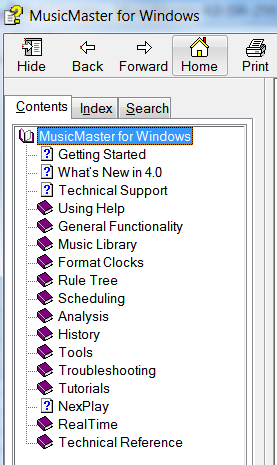
CONTENIDO
Este es el punto de partida para acceder a toda la biblioteca de ayuda “libros” en el sistema de ayuda MusicMaster. Haga doble clic en “MusicMaster for Windows” que se abre para revelar todos los libros disponibles para que elijas.
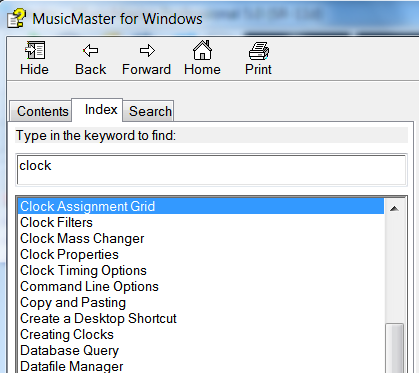
 INDICE
Haga clic aquí para una lista alfabética de temas, así como una barra de búsqueda al introducir palabras o frases para localizar temas en que estás interesado:
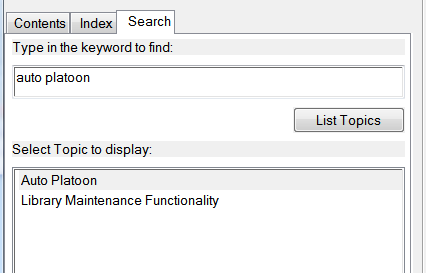
 BUSQUEDA
Otro método para obtener información sobre los temas que le interesa leer sobre:
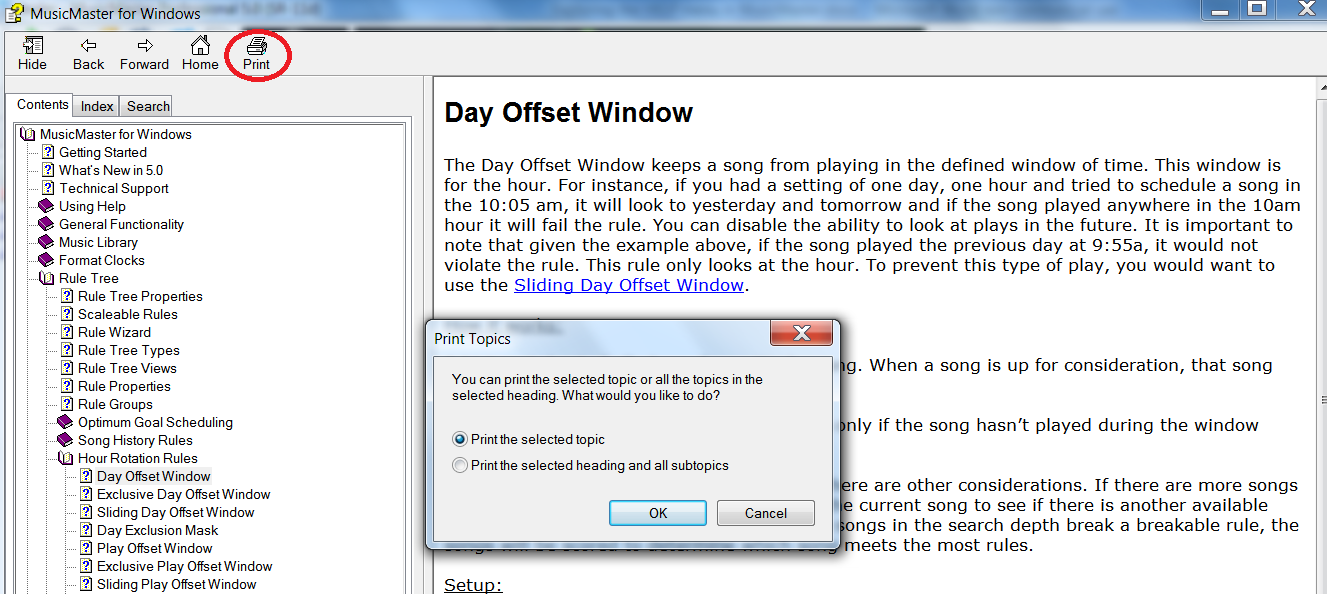
 Aquí hay una pregunta que surge de vez en cuando… “¿Dónde consigo el Manual de MusicMaster?”
Como MusicMaster para Windows se actualiza constantemente y refinado, estamos continuamente añadiendo y mejorando nuestra documentación. Como tal, le recomendamos imprimir las distintas subvenciones que necesita y asegurarse de que la información es la más actual sobre el tema. Como ejemplo, hemos entrado en la sección “Contenido” aquí para encontrar información detallada sobre la regla Árbol Hora reglas de rotación, específicamente el Día Ventana de desviación”. Tenga en cuenta que usted tiene la opción de impresión para seleccionar la impresora para imprimir sólo resumen de reglas específicas que, o para seleccionar el título seleccionado (Hora reglas de rotación) y todos los subtemas.
 CONSEJO’S PARA MUSICMASTER
Aquí encontrará MusicMaster, relacionados con la música y otros presupuestos puede ser útil a la hora de la aplicación. De forma predeterminada, esta ventana se abre y se gire a través de la lista cuando se abre el programa. Usted encontrará una casilla de verificación para desactivar si así lo desea. Háganos saber si usted tiene una idea para una adición a esta lista que piensa que otras personas pueden disfrutar o beneficiarse de…siempre estamos abiertos a recibir sugerencias.
 INFORMACION DE SISTEMA
Esta ventana puede indicarle al sistema operativo, service pack y que apuntan a construir. También indicará en la segunda línea si se activa, horario de verano para esta base de datos.
 Además, la lista de estos detalles enumera los componentes de Microsoft que MusicMaster requieren para funcionar correctamente, así como la versión actual. Si usted está teniendo problemas con su instalación MusicMaster funcionando correctamente, a menudo te tendremos a la visita esta lista para verificar que todos los sonrientes son verdes y “feliz”. Los que aparecen amarillo o rojo puede significar el componente en cuestión está desactualizada o falta. En ocasiones, el equipo de apoyo solicitará usted enviarnos los detalles de su máquina e instalado los componentes para ayudar a diagnosticar un posible problema con MusicMaster. Luego puede hacer clic en la opción “copiar al portapapeles” para crear una versión ampliada de esta lista, que a su vez puede ser enviada a utilizar para su revision posterior.
REGISTRO DE USUARIO
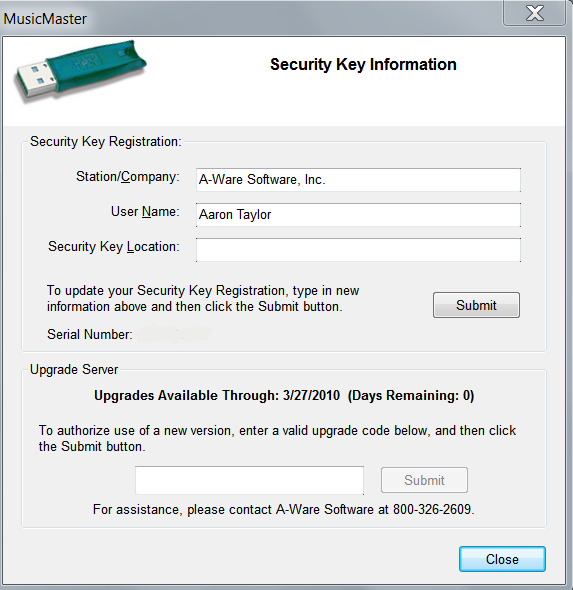
Usted necesitará verificar que está conectado a internet para obtener información que se muestran en esta sección.
Cuando haces click aquí, la aplicación MusicMaster intentará comunicar se a través de internet a nuestros servidores de licencias para obtener más información sobre tu clave “ping”. Típicamente esto mostrará el número de serie de su llave, la estación o organización que esta licenciado, así como el nombre de usuario. También mostrará información acerca de sus posibles días para actualizar su versión actual. Si usted ha comprado recientemente un upgrade a MusicMaster la ventana en blanco bajo de la sección “Servidor de actualización” será donde introduce el código proporcionado para actualizar tu llave USB y luego pulsa “Enviar”.
 VERIFICACION DE ACTUALIZACION
Sobre una base regular, A-Ware Software hace las actualizaciones disponibles para sus usuarios. Pueden ser las actualizaciones de versión principal, o comunicados de servicio que añaden nueva funcionalidad o solucionar problemas reportados a nosotros por los usuarios. Haga clic en esta opción del menú permitirá comprobar para ver si uno está disponible para usted.
Si tiene alguna pregunta acerca de las actualizaciones, o si se debe actualizar a una nueva versión, no dude en enviar una nota a su Consultor. Además, antes de comenzar cualquier actualización, haga una copia de seguridad de los datos antes de continuar.
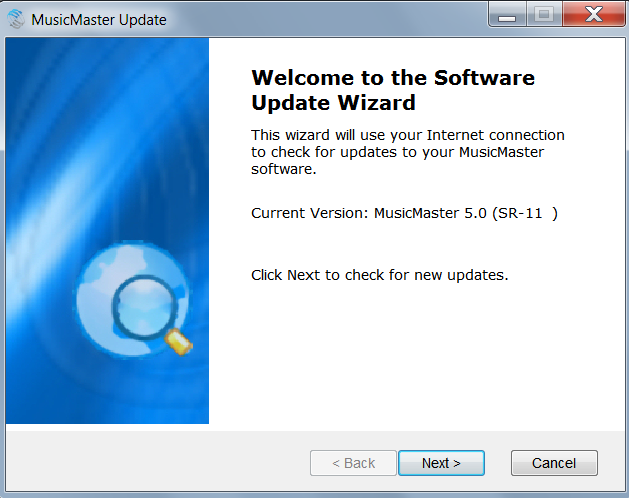 Si una nueva actualización de la aplicación está disponible para usted, usted verá una pantalla como la siguiente:
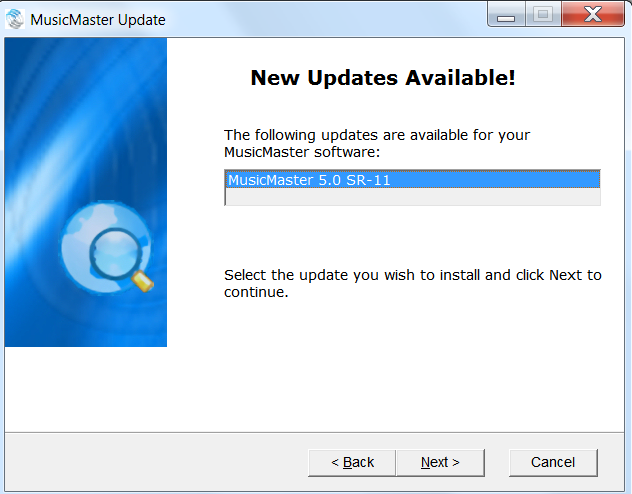
Desde aquí, siga las instrucciones para realizar la actualización a la versión más reciente.
De lo contrario, si todo es hasta la fecha, verá lo siguiente:
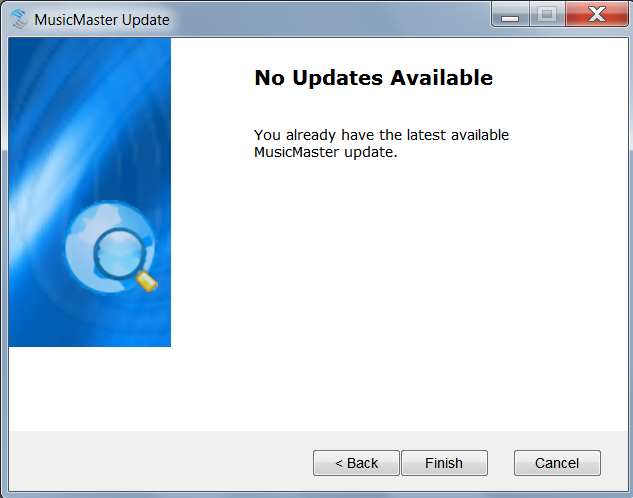 Otra vez, siempre haga reservas verificables de sus bases de datos antes de cualquier actualización de aplicación.
EL SITIO WEB DE MUSICMASTER
Cuando selecciona esta opción, MusicMaster lanzará su aplicación navegador interno predeterminado y llevarte al sitio web de MusicMaster. Valor de un artículo distinto de sí mismo
http://www.musicmaster.com/?p=2396 Acceda a nuestro artículos del blog, seminarios web, tutoriales, y capacitación portal de soporte aquí (sólo para nombrar unos pocos).
NOTAS DE LA VERSIO
En la parte superior de esta ventana, usted será capaz de verificar los sistemas operativos en los que esta versión es compatible con, así como otros importantes componentes de Microsoft, y le da orientación en cuanto a las actualizaciones si se aplica. Esto puede ser muy útil si usted está considerando la posibilidad de actualizar el sistema operativo en el equipo, o si está realizando la migración a un nuevo hardware.
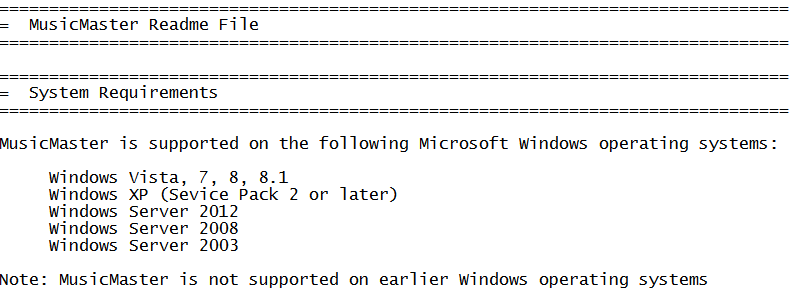 Esta sección también le dirá acerca de todas las mejoras, correcciones y adiciones que se han hecho en la versión de MusicMaster que se ejecutan actualmente y se vuelve a la primera versión de la versión que se está ejecutando actualmente. Usted puede encontrar que es útil para visitar esta sección cada vez que se actualice a aprender acerca de lo que es “una nueva y fresca” en la versión que está ahora en marcha. Si hay alguna parte de las notas de la versión que le gustaría obtener más información, póngase en contacto con su música Programación Consultor.
Si desea imprimir esta información para la lectura fuera de línea, es un archivo de texto simple que puede ser salvado si quieres fuera de la aplicación.
VER LA LICENCIA
Esta es la misma ventana de información que se ha hecho clic en “Aceptar” para cuando se instala la aplicación. Si necesita saber esta información después de que el hecho o si tiene preguntas, aquí está.
SOBRE MUSICMASTER
De un vistazo, esta ventana puede darle mucha información muy útil y le permiten navegar rápidamente a áreas en su máquina o red donde están instaladas las porciones de la solicitud o su base de datos.
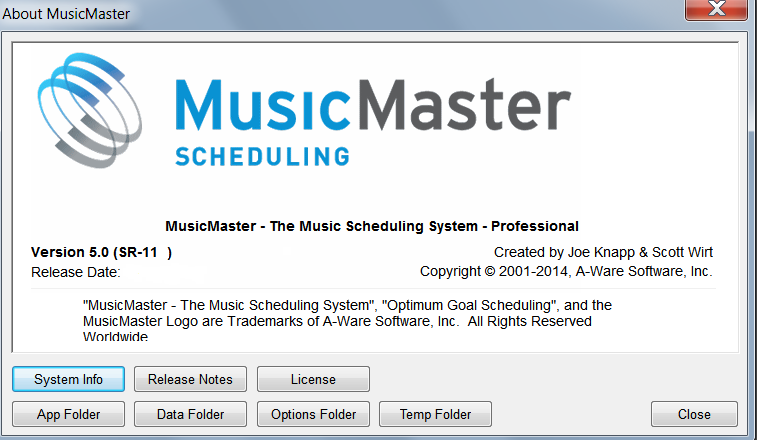 Información del sistema – Copia de la información detallada antes en este artículo.
Notas de la versión – Uplicación de la información detallada anteriormente en este artículo.
Licencia – Duplicación de la información detallada anteriormente en este artículo.
Carpeta de la Aplicación – Esto es donde se instalan la aplicación MusicMaster y archivos relacionados. Esto puede ser útil para hacer referencia a esta zona si no está seguro de su ubicación en su máquina o red.
Carpeta de Datos – Esto es donde sus bases de datos de MusicMaster se instalan. Esto puede ser provechoso para referirse a este área si está inseguro de su posición en su máquina o red.
Carpeta de Opciones – Los archivos de configuración de MusicMaster típicamente se localizan aquí.
Carpeta de Temp – MusicMaster y los archivos temp específicos OS se localizan en este directorio.
Como se puede ver, MusicMaster cuenta con una gran riqueza de la información contenida dentro del menú de ayuda que pueden ayudarle a saber más acerca de la aplicación, las bases de datos, y la versión instalada y la configuración. Si tiene más preguntas en cualquier momento, por favor llegar y ponerse en contacto, estaremos encantados de ayudarle.
MusicMaster Get Together Tour 2014 Publicado por Webmaster en mayo 11th, 2014

The MusicMaster family is growing constantly all over the world. To meet as many of our Clients as possible, we decided to go on the MusicMaster Get Together Tour. We will kick it off with a 11 city tour through Europe in May and June.
Joe Knapp, President of A-Ware software and the European partners will be there to give you some insight of what is happening on the MusicMaster development side as well as on the exciting plans for the future.
But the main reason for the tour is to meet and share a nice evening with you, with some drinks and snacks and lots of good conversations.
We all are looking forward to this tour very much and hope to see as many members of the MusicMaster family as possible.
- May 22: MusicMaster Get Together Tour 2014 – Berlin, Germany
- May 26: MusicMaster Get Together Tour 2014 – Brussels, Belgium
- May 27: MusicMaster Get Together Tour 2014 – Paris, France
- May 28: MusicMaster Get Together Tour 2014 – Madrid, Spain
- May 29: MusicMaster Get Together Tour 2014 – Barcelona, Spain
- June 2: MusicMaster Get Together Tour 2014 – Cologne, Germany
- June 3: MusicMaster Get Together Tour 2014 – Munich, Germany
- June 4: MusicMaster Get Together Tour 2014 – Vienna, Austria
- June 5: MusicMaster Get Together Tour 2014 – Zürich, Switzerland
- June 6: MusicMaster Get Together Tour 2014 – Milano , Italy
- June 10: MusicMaster Get Together Tour 2014 – Amsterdam, Holland
If you plan to attend, please register at http://register.onair.de or send a email to office@onair.de.
See you all soon!
RAIN Summit West Recap Publicado por Webmaster en mayo 10th, 2014

MusicMaster President, Joe Knapp, gave a revealing presentation at RAIN Summit West, the premiere educational and networking conference for the online audio industry. While speaking at the April 6, 2014, Las Vegas event, Joe promoted the idea that personal Internet radio enthusiasts may become the ‘farm system’ for future broadcasting talent and explained how MusicMaster Personal Edition (PE) can help these hobbyists change the industry by giving them access to professional music rotation software for under $300.
Interested in learning more? Visit www.musicmaster.com or contact Joe directly at: joe@mmwin.com.

Garry Wall, Joe Knapp, and John Gehron
All Access Worldwide Radio Summit Recap Publicado por Webmaster en mayo 9th, 2014
 Hundreds of radio pros, music enthusiasts and industry insiders converged on the legendary Hollywood Roosevelt Hotel for the 4th annual Worldwide Radio Summit. Team MusicMaster Worldwide co-hosted the Hard Rock Cafe Hollywood VIP Mixer (with our name in lights, shown below), featuring live performances by Zendaya, Christina Perri, and Daughtry.
 Many world-class speakers offered the latest information on selling and making money in a digital world, proper utilization of social media, talent development, product branding, and how labels go about developing artists and releasing new music.
Hats off to Joel Denver, Matt Parvis, Tyler Polzin, and the entire Summit crew for an amazing event.
Here are some impressions from the show:

MusicMaster’s Drew Bennett hanging out with MusicMaster client George Cook, spotting a familiar face on our video screen!

Wrapping another incredible All Access Worldwide Radio Summit (left to right: Wide Orbit’s Jeff Dempsey, Joel Denver from All Access, and from MusicMaster Shane Finch, Drew Bennett, and Aaron Taylor).

Our good friend Steve Resnik “The Ramp” and Melanie Ross of MusicMaster.
More Than Just Music – Scheduling Promos/Liners/Events with MusicMaster Publicado por Webmaster en mayo 8th, 2014
More and more stations around the world are starting to use MusicMaster not only for music scheduling but also for the professional handling of their station’s on-air promotion activities. The benefit they see is in taking advantage of the already built-in and vast amount of functionality that MusicMaster offers when it comes to content management and scheduling. They use MusicMaster to schedule their jingles, liners, promos, and voice tracks.
Gunnar Astrup, Head of Music at Alsterradio 106.8 in Hamburg /Germany: “Thanks to the possibilities in MusicMaster, it was an obvious decision for us to start outsourcing and professionalizing the scheduling of our station’s on-air promotion.”
If you are interested in knowing more about the different options of using MusicMaster besides music scheduling, don’t hesitate to get in touch with us.
This picture was taken during a two-day MusicMaster “on-air promotion scheduling” training at Alsterradio 106.8 in Hamburg: From the left: Gunnar Astrup (Head of Music), Maike Sieber (Music Director), Hannes Erdmann (Music Director), Benjamin Kanthak (Music Director), Steffen Schambach (Head of On Air Promotion), Alexander Schenk (On Air Promoter)
Canadian Music Week Sessions Publicado por Webmaster en mayo 7th, 2014

MusicMaster 2020
Music Scheduling Innovations for the Future
The premier music scheduling service in the world will be offering this session during Canadian Music Week, showcasing the increased depth in programming services offered by their company. Company president Joe Knapp will moderate this session and will be featuring some of his key players to help you use MusicMaster into the future and to answer any questions you may have about using their system to its maximum effect. Join us at Trinity 4-5 on May 7 from 1:00 – 1:50 PM.
RADIO: NETWORKING SUPER SESSION
Radio Consultants Roundtable Meetings
This gathering of the top minds of the game, all in one place, is your chance to pick the brains face to face of those whose experience and knowledge can deeply enhance your own, including that of MusicMaster’s Joe Knapp. Join us at Trinity 1-3 on May 8 from 11:00 AM – 12:30 PM.
NAB Show Recap Publicado por Webmaster en mayo 6th, 2014
With test drones flying over head and the very latest in broadcast technology on display, Team MusicMaster Worldwide spent time with a variety of global automation partners at the 2014 NAB Show®, April 5-10 in Las Vegas, NV. Over 93,000 enthusiasts got hands-on experience with cutting-edge technology at the world’s largest electronic media show covering filmed entertainment, and the development, management and delivery of content across all mediums.
MusicMaster representatives demonstrated how our World Class Software interfaces with various automation, playout, research, traffic and other systems.
Special thanks to our automation partners: iMediaTouch, David Systems, Netia, SCISYS Deutschland, Wide Orbit, and ENCO.
After each day’s festivities, personalized demonstrations and conversation made the MusicMaster hospitality suite at Wynn Resorts a popular destination (shown below).

We’ll see you at the September NAB Radio Show in Indianapolis!
Here are some impressions from the show:

MusicMaster’s Jesus Rodriguez and Drew Bennett with On Air’s Max Mueller
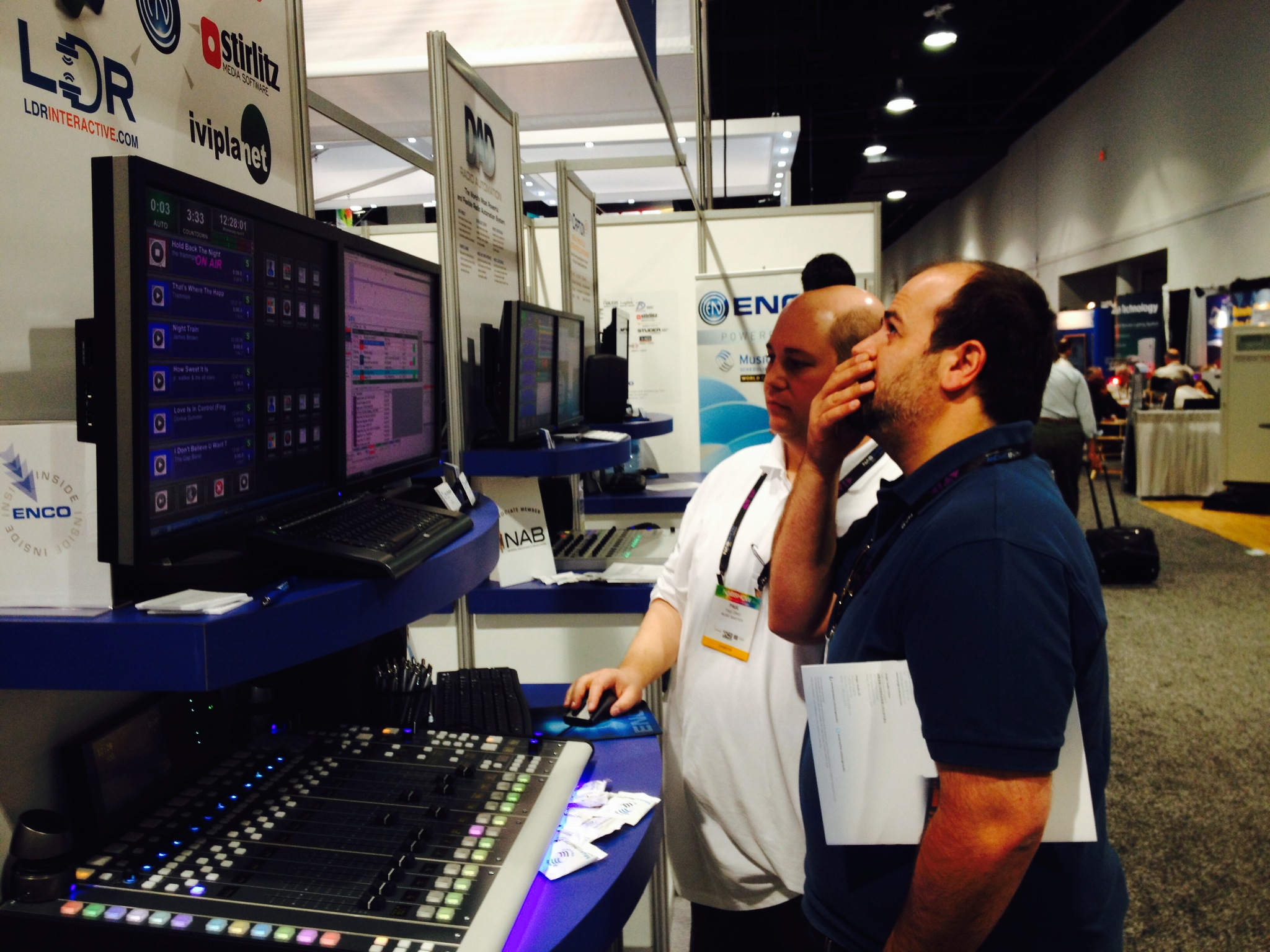
Paul Ziino shows off MusicMaster and ENCO…

…along with Aaron Taylor

iMediaTouch’s Bill Baines, client Jana Sproule, iMediaTouch’s Renel Choiselat, Gary Kristiansen, MusicMaster’s Joe Knapp, and iMediaTouch’s Scott Farr