
MusicMaster Blog
Dayparting Options by the Full Hour, Half Hour or Quarter Hour! posté par Joseph Knapp le April 5th, 2010
Most of you are aware that you can daypart a song or promo in MusicMaster by using the dayparting field. However, were you aware you can also restrict which part of the hour a song card is permitted to play? Let’s create a new restriction today on a song you NEVER want to play in the first 15 minutes of the 5pm hour. Double click on the dayparting field, put an “X” in the 5pm hour – then look to the Pink Pie icon at the top of the Daypart Restriction box, and click on it twice. That gives you the quarter hour options. To restrict a song from opening the hour – just remove the X from the first quarter hour. Save and Apply. Of course, be sure the dayparting rule is in effect in your rule tree as well!
Category Groups posté par Joseph Knapp le April 2nd, 2010
By Paul Ziino
Always creating the same query over and over for the same bunch of categories? You can create a Category Group instead!
Go to Dataset/Library/Categories, then click Groups. On the Category Groups screen click New and name this group–something like "Active Music" or "Current Rotation" or whatever you—like and click OK. Now check each category you want to include in this new Category Group and click OK. Back to the Category Groups screen click OK once again. Your new category Group will be listed in the Music tab of the info bar beneath Entire Library, Music Categories, and Non-Music Categories. You can also access this new Category Group when you are in any query box by using the dropdown where it says "Entire Library".
Schedule Editor: Show/Hide Elements posté par Joseph Knapp le March 31st, 2010
By Paul Ziino
In an attempt to de-clutter your schedule editor, you can hide any number of things from the view simply by clicking the "Show/Hide Elements" icon (2nd from right in schedule editor).
On the Elements tab you can un-check any element types you do not wish to view. Hide your Lognotes, Scheduled Non-Music Songs, Hour Markers, and more.
The Toolbars tab allows you to select and un-select the Hour Selection bar, Instant Analysis, Results Bar, and the Test Results panel.
And the Categories tab allows you to hide any specific categories. You're only concerned about your currents? Hide everything else. Just remember to turn things back on when needed.
All hidden items are indicated by a red line in the schedule editor, just to let you know that something is there, you're just not seeing it.
Forced position search – you choose the field posté par Joseph Knapp le March 30th, 2010
By Marianne Burkett
In MusicMaster clocks you’ve got some options when it comes to searching for a “Forced Position” song card. By default you can search by Song ID – but you can also add another field to search by. Search by Category or Automation number, Title, etc…. Check out your field map in Dataset/Library/Fields and find the number of the field you’d like to search by, then head over to Tools/Options/Additional Properties and put the number of the field in Forced Song Search. Then, when you select a forced element in the clocks – you’ll have 2 ways to search! Song ID and whichever field you chose.
Editing Trivia posté par Joseph Knapp le March 29th, 2010
by Paul Ziino
You can edit trivia in MusicMaster by going to Dataset/Library/Trivia, then using the dropdown box to edit Song Trivia, Artist Keyword Trivia, Title Keyword Trivia, and so on.
To add trivia to a song, go to the song in question and click the "View/Edit Song Trivia" icon (2nd from right, looks like an envelope and paper clip) in library maintenance. When trivia is present on a song, the icon is green. When a song has no trivia, the icon is beige.
That same icon is available in your keyword edit boxes for assigning Artist Keyword, Title Keyword, and other keyword trivia. It also turns green when trivia is present for the keyword in question.
Take Advantage of your Library Maintenance Icons! posté par Joseph Knapp le March 26th, 2010
By Marianne Burkett
Have you taken advantage of the “Find Matching Values” icon in library maintenance? For instance, if you have your cursor on a songs “Mood” field and the value is 5, click on the Find Matching Values icon and every Mood 5 song will come up on your screen. You can try it on other fields as well, like Automation number – Gender – Artist – Intro, etc… and a great way to quickly find what you’re looking for.
Jump to Unscheduled Items posté par Joseph Knapp le March 25th, 2010
by Paul Ziino
Here's a quick tip for you… If you want to find unscheduled items in your Schedule Editor, hold the Ctrl button on your keyboard and click the "Jump to Next Failure" or "Jump to Previous Failure" icon in the editor. This takes you immediately to the next or previous unscheduled position. And if there are no more unscheduled positions, you'll receive an error indicating "no matching failures found".
Section Tabs in the Info Bar posté par Joseph Knapp le March 24th, 2010
By Drew Bennett
Your info bar is the place in the software where you can see your categories listed. It’s usually docked on the left side of your MusicMaster software. But did you know you can get to clocks and even music logs from within the info bar? Take a look at the bottom of the info bar and you will see three tabs; the green music note tab shows your categories, queries and song lists. The clock tab shows all the clocks in the data and the calendar tab shows recent music logs. You can double click on a clock or a music log to be taken straight there without having to use the menus or icons at the top of the software.
Start and End Day/Hour posté par Joseph Knapp le March 23rd, 2010
By Paul Ziino
Now that spring is officially here, it’s a good time to make plans for your “summertime songs”. You can load them into your database today, but not allow them to start scheduling until Summer arrives.
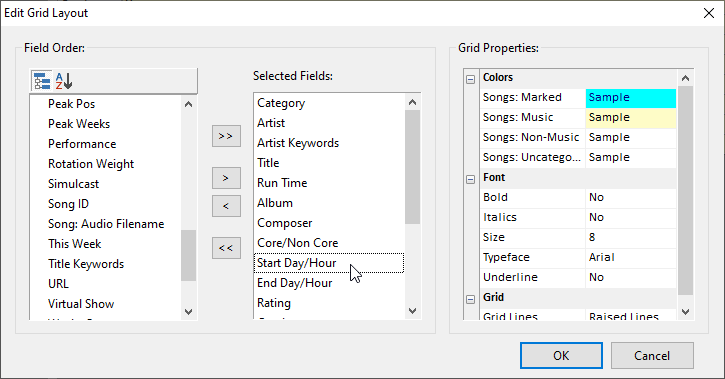
First, you’ll want to add the “Start Day/Hour” and “End Day/Hour” field to your library grid layout.
Then go to the “Start Day/Hour” field in your library grid, or “Starts” on the song card view. Double-click in that field and select the date and time you’d like that song to become eligible. If you don’t fill in a time, midnight will be the default. You can use “End Day/Hour” or “Ends” field to effectively kill that song at the end of summer, too.
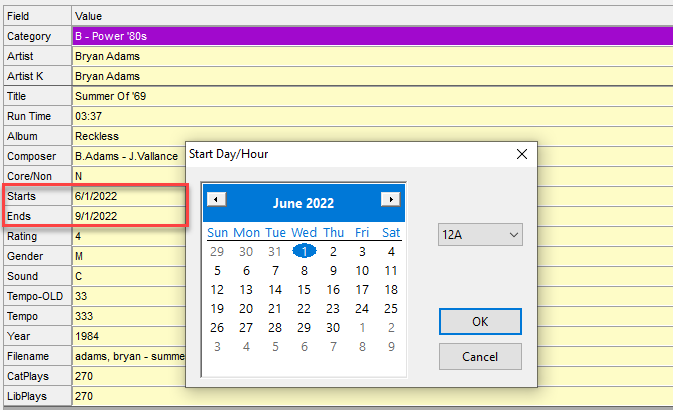
And there are no rules to turn on to make this happen–they’re built-in!
This comes in handy for those songs you only want to run June through August, or only in December, but keep them in the regular rotation categories all the time.
Scheduling Countdowns! posté par Joseph Knapp le March 19th, 2010
By Marianne Burkett
So, you’ve decided to do a daily Countdown or perhaps a larger scale “Top 100” Countdown this weekend. In MusicMaster – whether it’s top 5 or 500 songs – you can automatically generate that Song List with the History Browser!
Dataset/Analysis/History Browser. Select your frame of time and which Music Categories you’d like included in the countdown. Set up the Details tab with “Individual Songs”. Go down the list and pick your number and press okay.
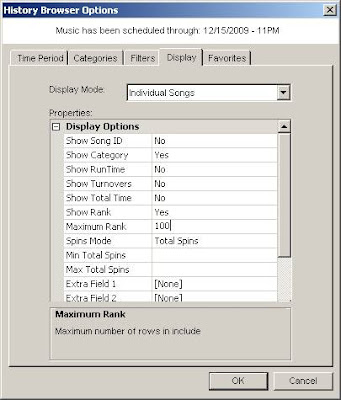 Doing this will Open the Browser. Report in order of Rank & Spins. Save as List. This will create a new Song List.
 After you’ve created your Song List, right click on the song list and open the song list editor to make whatever tweaks you’d like to the list, like Reversing the Order so the number 1 song is at the end of the countdown.
Then, in your clocks – you’ll be using Element Type “Saved List”. Plug the List directly into the clocks (be sure to begin with “First”). Typically you’d have 2 clocks: the start of the countdown clock and then the continuation clock, which would begin with Saved List “Next”.
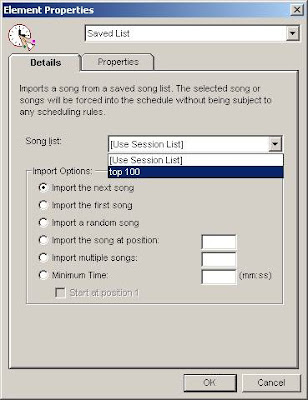 Plug those clocks into the assignment grid and you are done. Run the Automatic Scheduler. The list lays down first without looking at rules and then the rest of your music and non-music will schedule around it.
Happy Scheduling!