
MusicMaster Blog
The Ultimate Tie-Breaker: How MusicMaster’s Optimum Goals Pick the “Best” Song (Not Just A Good One) posted on August 25th, 2026
by Chris Hulsether and Joe Knapp
Picture this: it’s 2:47 PM, and MusicMaster is staring down five songs that all pass every single rule you’ve built. They’re all clean. They’re all safe to play. They’re all… equally fine.
So which one actually plays?
If you’ve ever wondered how the scheduler makes that final call, the answer could be the next song in the schedule order, but the better answer is when you use Optimum Goal Scheduling, and once you understand it, you’ll start thinking about your rule tree a little differently.
Wait, Don’t Rules Already Handle This?
Sort of. Rules are bouncers, they decide who’s allowed in the club. But once you’ve got a handful of songs that all cleared the door, rules go quiet. They don’t have an opinion about which of those “acceptable” songs is actually the best one for this exact moment.
That’s where Goals step in. Think of Goals as the tie-breaker judge who shows up after the bouncers have done their job, looks at everyone still standing, and says, “Okay, out of all of you… who’s really earned this slot?”
How the Judging Actually Works
Here’s the behind-the-scenes version:
MusicMaster scans your search depth and builds a shortlist of every song that survives your rules.
That shortlist gets handed to your Goals.
Each Goal scores every song on the list.
If you’re running multiple Goals, the ones higher up your list carry more weight.
All those scores get combined into one overall score per song.
Highest score wins the slot.
One quirk worth knowing: if there’s only one song left standing after your rules run, the Goals don’t even get invoked, there’s no tie to break. Goals only enter the picture when there’s genuinely a choice to make.
Now let’s talk about three of the MVPs of the Goal lineup.
Optimum Song Rest, The “Everybody Deserves a Turn” Goal
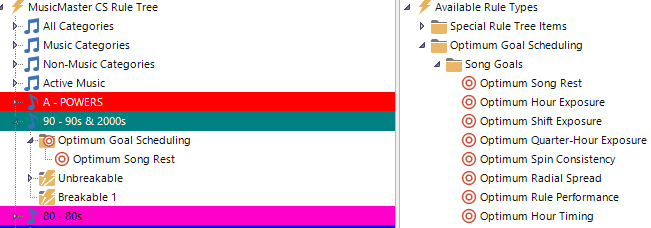
This is the simplest goal to wrap your head around, and often the most satisfying to watch work. It simply favors whichever song has rested the longest since it last played.
The Optimum Goals learn from your database and just know how to do their job. It’s like having an AI agent working within MusicMaster. That’s why there are no settings you need to adjust.
Optimum Rest scores 100 when the song tested has rested the ideal amount, given the math, based on category size and clock calls. Less rested songs get a lower score, while songs that are overdue for airplay get a slightly higher score.
Optimum Radial Spread, The Goal With a Sense of Time and Place

This one is really smart! Radial Spread favors songs that have rested the longest specifically in the part of the day being tested, and it weights nearby hours more heavily than distant ones.
Why that matters: Imagine a song has played heavily in your morning drive but hasn’t touched your evening hours in weeks. Straight-up song rest might not flag it as urgent if it played recently overall. But Radial Spread looks at the shape of when it’s played and notices, “hey, this song hasn’t been anywhere near this part of the day in a while,” and gives it a boost specifically for filling that gap.
Example: A song played twice during morning drive this week but hasn’t been scheduled in the evening in over a month. When evening comes around and it clears your rules, Radial Spread recognizes the evening “hole” in its play history and weights it favorably, helping your station avoid that subtle feeling of songs always showing up at the same time of day.
Optimum Keyword Rest, Rest Tracking for Artists (and More)
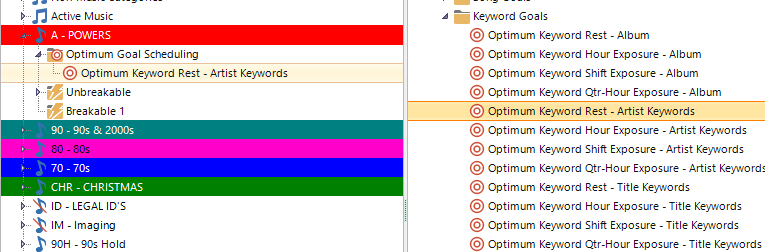
Song Rest looks at individual songs. Optimum Keyword Rest zooms out and looks at keywords, which is exactly what you want when you’re managing artist separation, not just song separation.
Every keyword has its own ideal rest amount, and this Goal favors whichever song’s keyword has rested closest to that ideal.
Example: Let’s say you’ve got an “Artist Keyword” tagging every song by a specific artist. Two different songs by that artist both clear your rules for the same slot. Optimum Keyword Rest checks how long it’s been since that artist last played (not just the individual songs) and favors the one that best matches the artist’s ideal rest window, helping you avoid that “wait, didn’t we just hear this artist?” feeling, even when it’s technically a different song. It works constantly to separate songs with the same Artist Keyword as evenly as possible.
The Real Takeaway
Optimum Goals aren’t a replacement for your rules, they’re what kicks in after your rules have already done their job narrowing the field. It’s worth keeping some rules in place even when using Goals. Rules set the guardrails; Goals pick the winner within them. For things like Artist separation, you only need one simple minimum time separation rule that acts like a “brick wall” to prevent a worst-case scenario. Same with Minimum Rest for individual songs. The more complicated rules you may have used in the past can all go away. Let the Goals do their job instead!
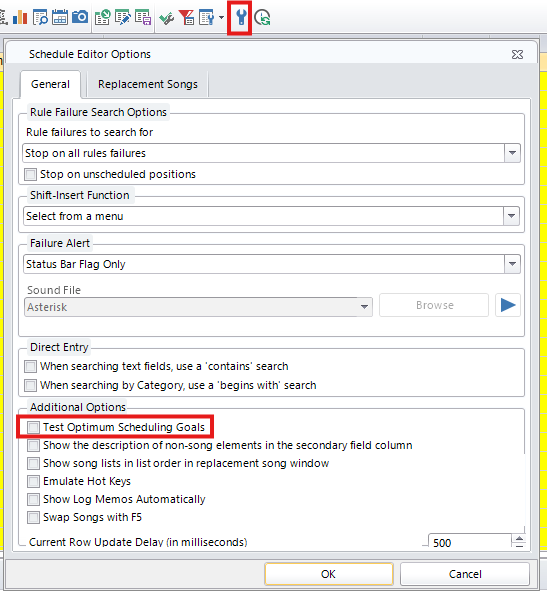
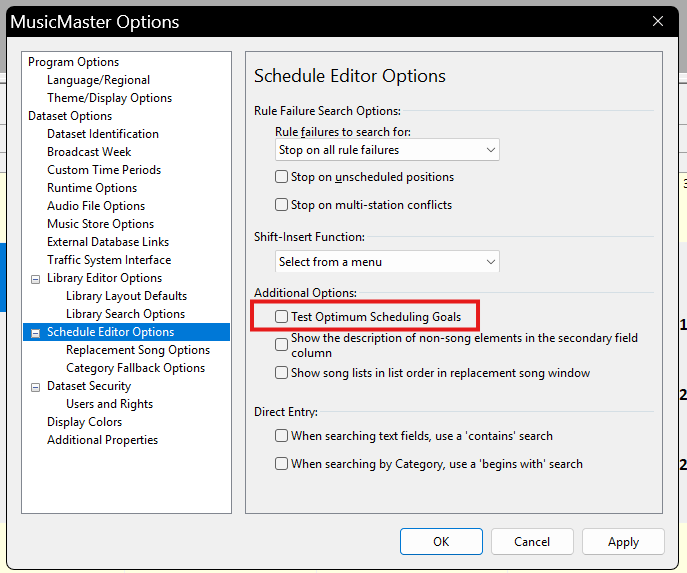
If you haven’t experimented with stacking a couple of these, say, Song Rest as your priority and Radial Spread as backup, it’s worth testing in the Schedule Editor’s replacement window. Just flip on “Test Optimum Scheduling Goals” under Additional Options, and you can watch the scoring happen in real time.
In MusicMaster CS look for the Wrench Icon in the Schedule Editor:
In PRO Go to Tools/Options/Schedule Editor Options
In CS Web look for the Options Icon in the Schedule Editor:
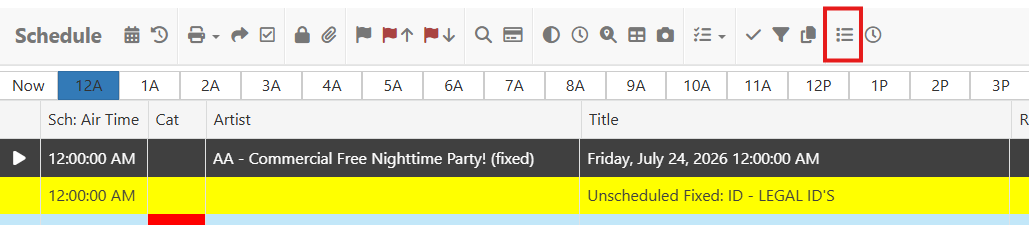
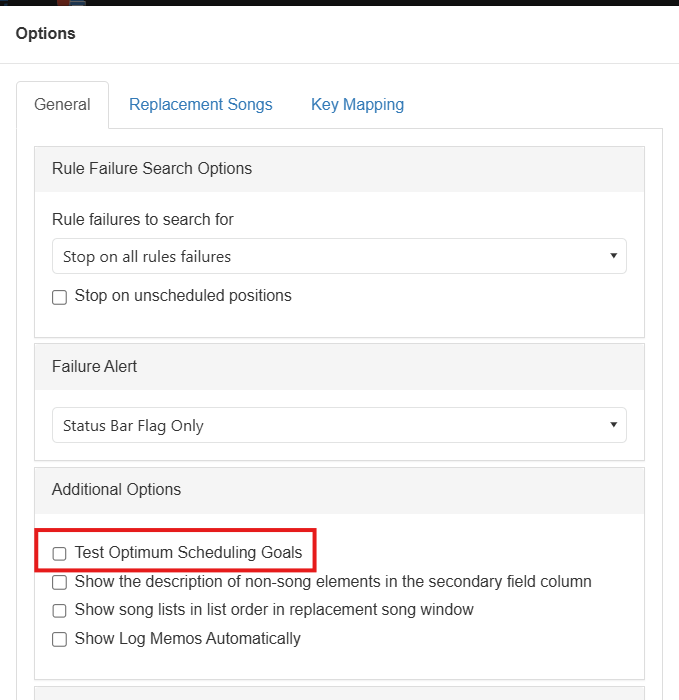
Once you see it in action, you’ll never look at a “tie” in your search depth the same way again.
If you have any questions about Optimum Goals Scheduling and what goals work best for you, contact your Music Scheduling Consultant!