
MusicMaster Blog
Designing MusicMaster CS Roles for a Multi-Station Enterprise posted on October 26th, 2026
by Jerry Parker, MusicMaster Director of Operations
As a MusicMaster Client-Server (CS) installation grows, one of the administrative challenges that can sneak up on you is user security.
With a handful of stations and a small programming staff, almost any reasonable role structure will work. You may have a Program Director role, an Assistant Program Director role, an Administrator role, and perhaps a few special-purpose roles created as the need arises.
Expand that environment to 10, 20, or 30 stations, however, and those simple decisions can become surprisingly difficult to manage.
The solution isn’t necessarily more roles. In many cases, it is fewer, better-designed ones.
Understanding the Model
A USER is typically assigned one or more ROLES, and then the result is applied to one or more STATIONS.
Each role contains a collection of rights, privileges, and activities available within the platform. When multiple roles are assigned, their privileges are combined. Once that combined set of capabilities is applied, the result is then applied to one or more stations. The User can then perform the activities or workflows defined by their combination of roles, within those stations.
Conceptually, the model looks like this:
USER => Role A + Role B + Role C => Sum of privileges => Station 1 + Station 2 + Station 3
This distinction becomes extremely important as an organization grows.
Don’t Build Roles Around People
One of the easiest traps in a large installation is creating roles that mirror job titles or individual employees.
You might begin with:
- Program Director
- Assistant PD
- Music Director
- Production Manager
- Market Manager
Then someone needs slightly different access. You then create a new role, assign it to the person, and now you have:
- Program Director
- Program Director Limited
- Assistant PD
- Assistant Program Director Plus
- Music Director
- Production Manager
- Market Manager
- And so on
At some point, the role structure stops describing the operation and starts describing individual employees. That’s difficult to maintain, difficult to audit, and even harder for the next administrator to understand.
A useful warning sign is a role occupied by only one person. That isn’t necessarily wrong, but it is worth asking why that role exists.
If most users eventually require their own customized role, the role architecture probably needs another look.
Think in Capabilities Instead
For a larger MusicMaster CS installation, it can be more effective to think of roles as collections of related capabilities.
For example, an organization might establish roles along the lines of:
- Scheduling: The activities normally required to create, edit, review, and work with schedules.
- Library Maintenance: The privileges associated with maintaining songs, categories, attributes, and other library information.
- Clock / Grid Maintenance: The ability to create and modify clocks.
- Scheduling Rules: Access to the tools used to establish and maintain scheduling rules.
- Audio and Metadata: Activities associated with audio and related metadata.
- Reporting and Analysis: The reporting, analysis, and export capabilities appropriate to users who need them.
- Administration: The relatively small collection of activities that truly require administrative authority.
Of course, these are only examples rather than a prescribed MusicMaster configuration. Every organization operates differently.
The important idea is that each role represents a coherent body of work.
Roles Add Up
This is where the MusicMaster CS model becomes particularly useful.
Suppose UserA is responsible for scheduling and library maintenance and also needs reporting capabilities. Rather than creating a special role for them, or even a role called Senior Music Director, you might simply assign:
- Scheduling + Library Maintenance + Reporting, and let MusicMaster CS combine the privileges contained in those roles.
Now suppose UserB schedules one station but isn’t responsible for maintaining its music library. The assignment might be:
- Scheduling + Reporting. The same roles are being reused. The combination describes the person’s responsibilities.
A role should represent a recognizable body of work. A combination of roles should represent a person’s responsibilities.
Stations Define the Scope
The remaining piece is station assignment.
- User A may have: Scheduling + Library Maintenance + Reporting, applied to WAAA-FM, WBBB-FM and WCCC-FM
- User B may have: Scheduling + Reporting applied only to WDDD-FM
This is an important reason to avoid building station identity into the role structure unless there is a specific operational reason to do so. You generally shouldn’t need WAAA Music Director, WBBB Music Director, and WCCC Music Director if the underlying privileges are identical.
The roles describe the capabilities. The station assignments establish their scope.
Keeping those two concepts separate can dramatically simplify an enterprise configuration.
Consider the Many-Station Problem
Imagine an organization operating 25 stations across several markets.
Over time, it decides that everyone responsible for music-library maintenance should have access to an additional MusicMaster CS capability.
In an environment built around job-title roles, the administrator may have to determine whether that privilege belongs in Program Director, Assistant Program Director, Music Director, Corporate Program Director, Market Program Director, Programming Assistant, and several locally created variations.
Worse, those roles may have accumulated slightly different permissions over the years. In a capability-oriented model, the question can become much simpler:
Does this capability belong to Library Maintenance? If the answer is yes, update that role.
Everyone who has been assigned Library Maintenance receives the appropriate capability within the scope of their station assignments.
That is much easier to understand and maintain.
Don’t Go Too Far the Other Direction
There is another trap here.
If combining roles is powerful, why not create a separate role for every individual privilege?
Because then you have simply traded one management problem for another. An administrator shouldn’t need to assign 37 roles to give someone the capabilities normally associated with scheduling a radio station.
Roles should be large enough to represent meaningful activities, but small enough to be reusable.
Think in terms of bodies of work, not individual checkboxes. If several privileges almost always travel together operationally, they probably belong together.
Exceptions Should Be Exceptions
Every organization has unusual situations.
Someone temporarily covers another station. A corporate programmer needs access to several markets. A production employee needs one capability normally associated with programming. Someone is being trained for a new responsibility. Those situations don’t necessarily justify redesigning the entire role structure.
Before creating another role, ask:
- Can the requirement be satisfied by combining existing roles?
Then ask:
- Can the scope be handled through the station assignment?
Only after those possibilities have been considered should you create another permanent role.
This helps prevent an installation from accumulating years of roles created to solve one person’s temporary requirement.
Privilege versus Paralysis
Security design frequently invokes the principle of least privilege: users should receive only the access necessary to perform their responsibilities. That’s a good principle. However, when taken too literally, it can produce a system in which every ordinary task requires another permission request.
The objective should be to create sensible operational boundaries.
Someone responsible for scheduling should have the capabilities normally required to schedule effectively. Someone maintaining the library should have the tools necessary to maintain it. Truly administrative or potentially disruptive capabilities can be reserved for the people responsible for them.
The goal isn’t to see how few privileges can be granted. The goal is to give people the authority required to do their jobs while maintaining clear and intentional boundaries.
Periodically Audit the Structure
A MusicMaster CS installation should occasionally review its roles rather than simply continuing to add new ones: Look for roles that have no users, have only one user, duplicate another role, differ from another role by only one or two privileges, contain privileges that no longer match their name, or were created for a temporary situation that no longer exists.
Don’t forget to review station assignments as well. People change jobs. Stations change programming responsibility. Markets are reorganized. Employees leave.
A clean role architecture makes those changes easier to identify and much easier to implement.
Final Thought: Design for the Organization You Are Becoming
A five-station MusicMaster CS installation and a 30-station enterprise don’t necessarily need different security features. They need different ways of thinking about the same features.
At larger scale, try to resist the temptation to create a role for every title, market, station, or exception.
Instead, separate the questions:
- Who is this person?
- What activities are they responsible for?
- Where are they responsible for them?
MusicMaster CS already provides the pieces necessary to answer those questions independently.
- Use roles to describe capabilities.
- Combine roles to describe responsibilities.
- Use station assignments to define scope.
The result is a security model that is easier to understand, easier to audit, and perhaps most importantly, much easier to change as the organization grows.
A good MusicMaster CS role structure shouldn’t describe every employee in the company. It should describe how the company works.
Importing Enterprise Songs in MusicMaster CS posted on October 31st, 2025
by Brian Wheeler
How cool would it be to be able to add songs to your station with just a click or two? I want to highlight a feature in MusicMaster Client-Server and the Web Client that allows you to ingest songs that are in the Enterprise database but not currently in your specific station.
This feature can be accessed through the Library menu, or when in the Library Maintenance menu, you can click on the icon on the toolbar to access the function.
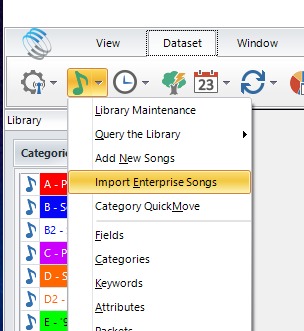
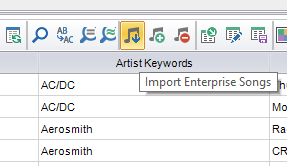
To access this in your station, you must first have rights to access Enterprise and the setup. Once you have rights, you can add or modify the available assets in your station.
To configure the query that will enable your search of the available assets in Enterprise, you must first open Import Enterprise Songs within Enterprise. It’s here that you’ll provide a query for users to find songs they want to import into their station.
Add a new query, starting with the name of the query. Try to be specific in the description so it’s easy to tell precisely what the user can find using this query.
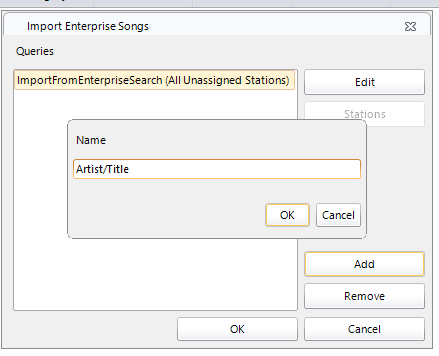
Now select the station(s) you want to receive these new songs.
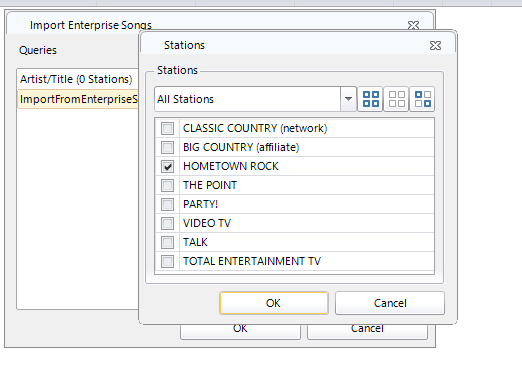
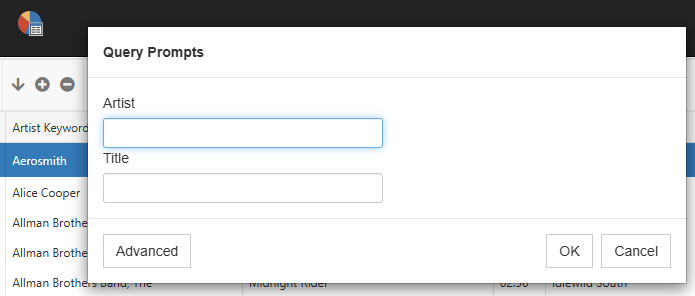
The last step will be to create the actual prompts. Use the Query Prompt steps you’d normally use to create a Query, then save your settings.
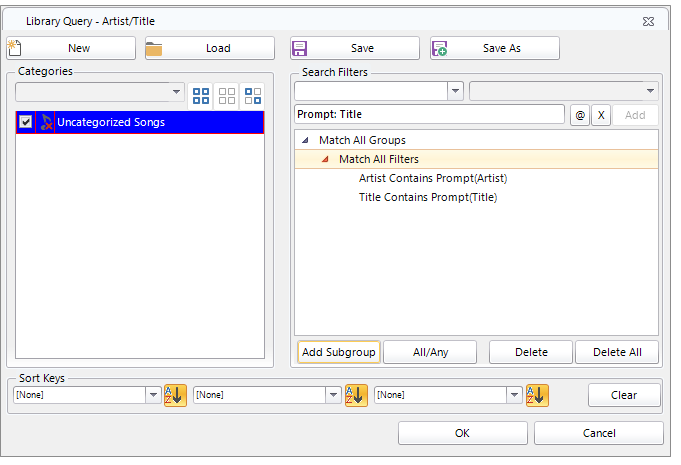
Now that the preliminary settings are in place, if a user decides to import songs from Enterprise, they can click on Import Enterprise Songs at the station level and proceed to find their desired songs for importing.
This is how the query looks in the Web Client, which is similar to the CS view.
In this case, I’m looking for “Summer” songs for a bit I’m doing for a weekend show. The songs in gray are songs that already exist in the station. White songs are not currently in the station. I’ll select two more songs (seen here in gold) that are in Enterprise for my purposes.
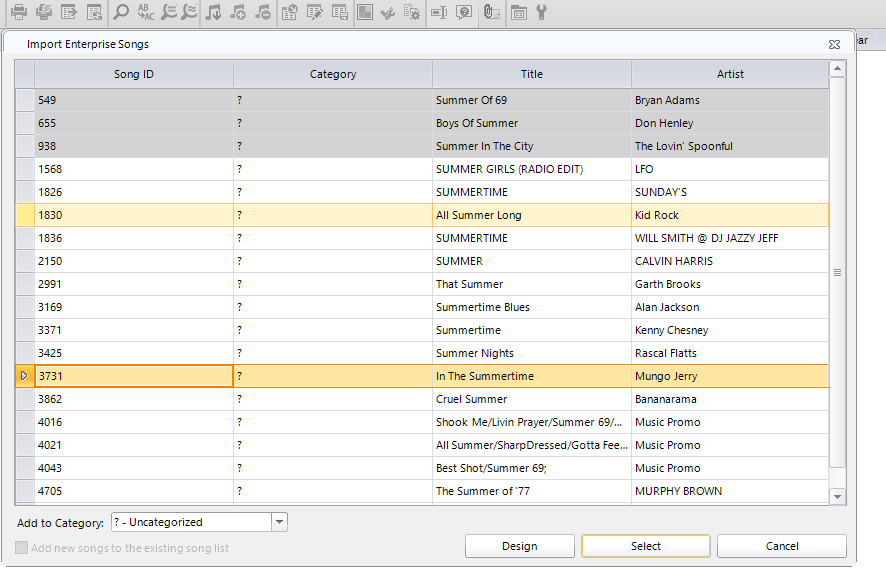
and in the Web Client:
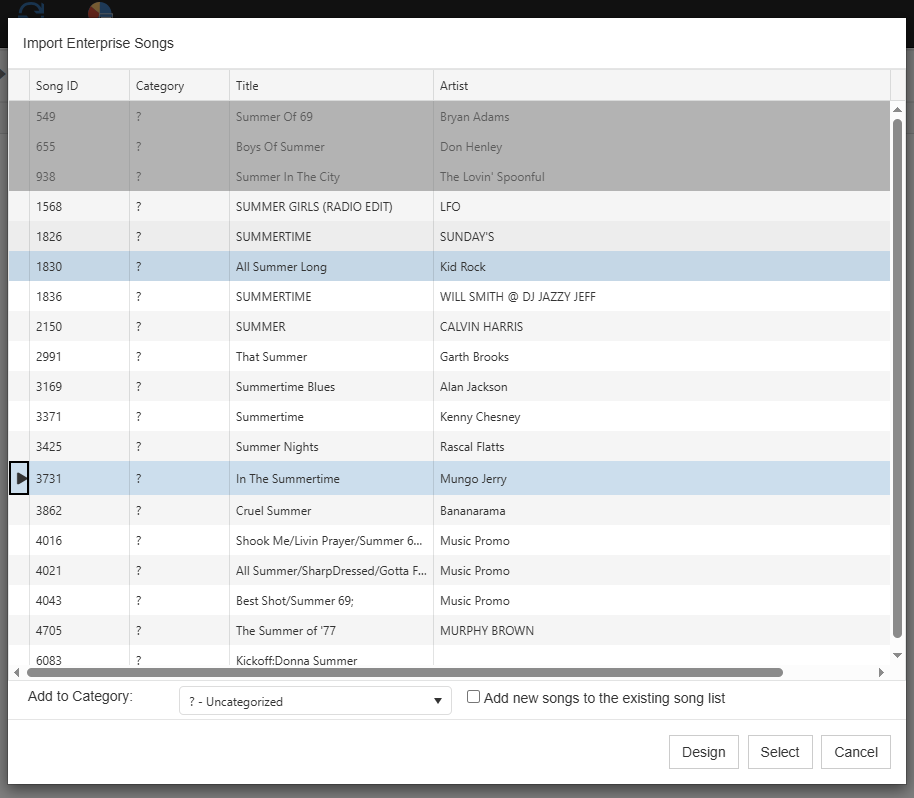
You may see that I elected to drop these songs into my Uncategorized folder. You can select any category to drop those songs in from Enterprise.
As with a library layout, you can add additional fields to the view by clicking on the Design option and adding fields to the view.
Now I’m ready to click Select and add these songs to my station! Pretty slick. Later, I can move these songs to any category I wish.
Of course you can use quite a few fields in your query, so if you’re searching for music with more subtle features, perhaps songs that match a mood or theme, you can search for those as well. As long as the songs exist in Enterprise and are coded accordingly, you can find them and import them.
If you have more questions regarding this or any other feature in MusicMaster CS or the Web Client, feel free to contact any of the MusicMaster Scheduling Consultants to get the answers.