
MusicMaster Blog
The Ultimate Tie-Breaker: How MusicMaster’s Optimum Goals Pick the “Best” Song (Not Just A Good One) publicado em August 25th, 2026
by Chris Hulsether and Joe Knapp
Picture this: it’s 2:47 PM, and MusicMaster is staring down five songs that all pass every single rule you’ve built. They’re all clean. They’re all safe to play. They’re all… equally fine.
So which one actually plays?
If you’ve ever wondered how the scheduler makes that final call, the answer could be the next song in the schedule order, but the better answer is when you use Optimum Goal Scheduling, and once you understand it, you’ll start thinking about your rule tree a little differently.
Wait, Don’t Rules Already Handle This?
Sort of. Rules are bouncers, they decide who’s allowed in the club. But once you’ve got a handful of songs that all cleared the door, rules go quiet. They don’t have an opinion about which of those “acceptable” songs is actually the best one for this exact moment.
That’s where Goals step in. Think of Goals as the tie-breaker judge who shows up after the bouncers have done their job, looks at everyone still standing, and says, “Okay, out of all of you… who’s really earned this slot?”
How the Judging Actually Works
Here’s the behind-the-scenes version:
MusicMaster scans your search depth and builds a shortlist of every song that survives your rules.
That shortlist gets handed to your Goals.
Each Goal scores every song on the list.
If you’re running multiple Goals, the ones higher up your list carry more weight.
All those scores get combined into one overall score per song.
Highest score wins the slot.
One quirk worth knowing: if there’s only one song left standing after your rules run, the Goals don’t even get invoked, there’s no tie to break. Goals only enter the picture when there’s genuinely a choice to make.
Now let’s talk about three of the MVPs of the Goal lineup.
Optimum Song Rest, The “Everybody Deserves a Turn” Goal
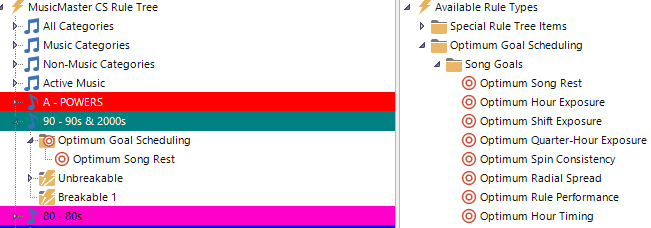
This is the simplest goal to wrap your head around, and often the most satisfying to watch work. It simply favors whichever song has rested the longest since it last played.
The Optimum Goals learn from your database and just know how to do their job. It’s like having an AI agent working within MusicMaster. That’s why there are no settings you need to adjust.
Optimum Rest scores 100 when the song tested has rested the ideal amount, given the math, based on category size and clock calls. Less rested songs get a lower score, while songs that are overdue for airplay get a slightly higher score.
Optimum Radial Spread, The Goal With a Sense of Time and Place

This one is really smart! Radial Spread favors songs that have rested the longest specifically in the part of the day being tested, and it weights nearby hours more heavily than distant ones.
Why that matters: Imagine a song has played heavily in your morning drive but hasn’t touched your evening hours in weeks. Straight-up song rest might not flag it as urgent if it played recently overall. But Radial Spread looks at the shape of when it’s played and notices, “hey, this song hasn’t been anywhere near this part of the day in a while,” and gives it a boost specifically for filling that gap.
Example: A song played twice during morning drive this week but hasn’t been scheduled in the evening in over a month. When evening comes around and it clears your rules, Radial Spread recognizes the evening “hole” in its play history and weights it favorably, helping your station avoid that subtle feeling of songs always showing up at the same time of day.
Optimum Keyword Rest, Rest Tracking for Artists (and More)
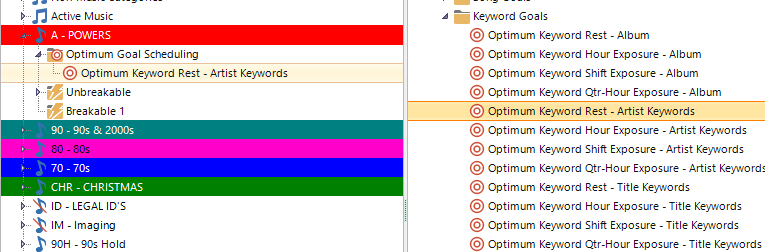
Song Rest looks at individual songs. Optimum Keyword Rest zooms out and looks at keywords, which is exactly what you want when you’re managing artist separation, not just song separation.
Every keyword has its own ideal rest amount, and this Goal favors whichever song’s keyword has rested closest to that ideal.
Example: Let’s say you’ve got an “Artist Keyword” tagging every song by a specific artist. Two different songs by that artist both clear your rules for the same slot. Optimum Keyword Rest checks how long it’s been since that artist last played (not just the individual songs) and favors the one that best matches the artist’s ideal rest window, helping you avoid that “wait, didn’t we just hear this artist?” feeling, even when it’s technically a different song. It works constantly to separate songs with the same Artist Keyword as evenly as possible.
The Real Takeaway
Optimum Goals aren’t a replacement for your rules, they’re what kicks in after your rules have already done their job narrowing the field. It’s worth keeping some rules in place even when using Goals. Rules set the guardrails; Goals pick the winner within them. For things like Artist separation, you only need one simple minimum time separation rule that acts like a “brick wall” to prevent a worst-case scenario. Same with Minimum Rest for individual songs. The more complicated rules you may have used in the past can all go away. Let the Goals do their job instead!
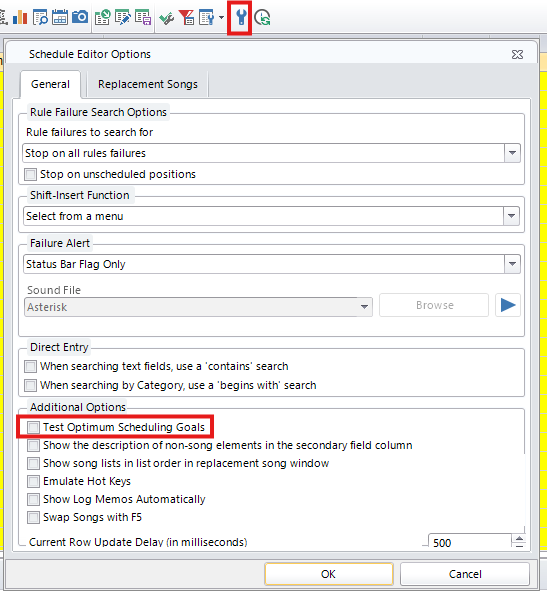
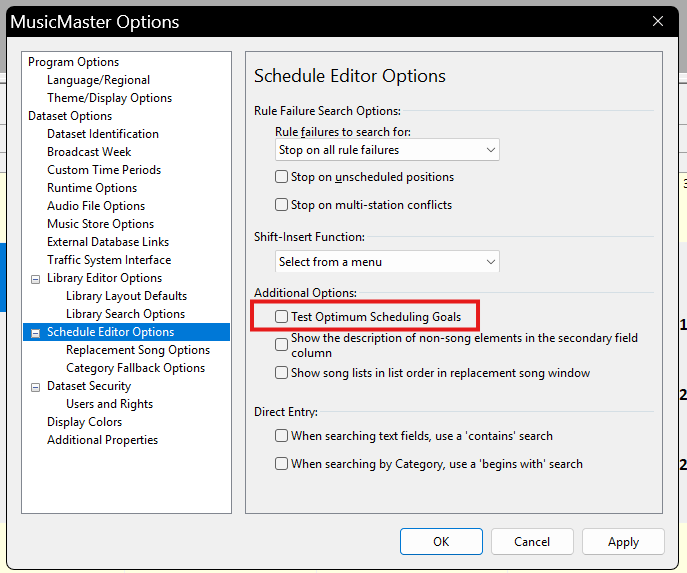
If you haven’t experimented with stacking a couple of these, say, Song Rest as your priority and Radial Spread as backup, it’s worth testing in the Schedule Editor’s replacement window. Just flip on “Test Optimum Scheduling Goals” under Additional Options, and you can watch the scoring happen in real time.
In MusicMaster CS look for the Wrench Icon in the Schedule Editor:
In PRO Go to Tools/Options/Schedule Editor Options
In CS Web look for the Options Icon in the Schedule Editor:
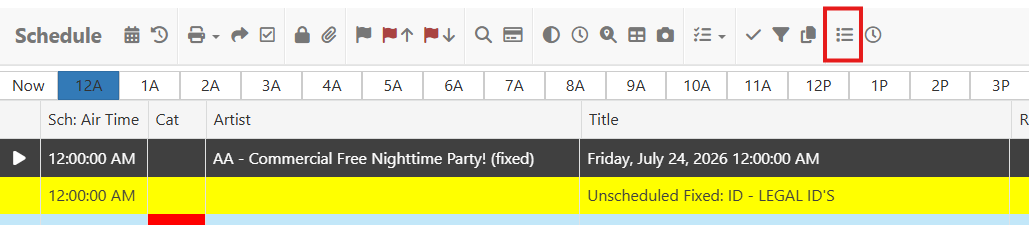
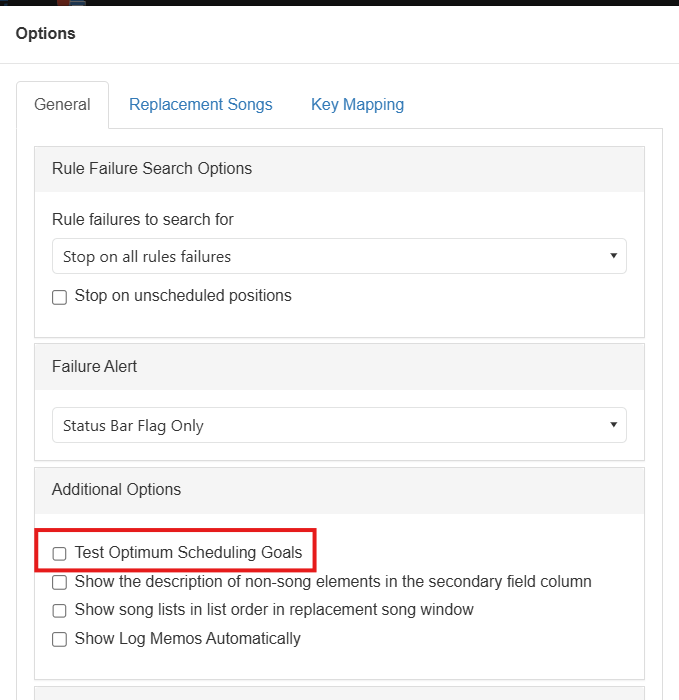
Once you see it in action, you’ll never look at a “tie” in your search depth the same way again.
If you have any questions about Optimum Goals Scheduling and what goals work best for you, contact your Music Scheduling Consultant!
How MusicMaster Oldies Works publicado em August 21st, 2023
How to Make 56,000 Oldies Sound Like a 590-Song Format
by Joe Knapp – Founder/President, MusicMaster
Listen to MusicMaster Oldies, streaming now on Live365, TuneIn, and iHeart, and you’ll hear something that sounds like a tight-formatted oldies format. But listen long enough and you will hear over 56,000 songs. How long do you have to listen to hear them all? Maybe ten years.
You can also hear it using the pop-out player on the MusicMaster Oldies Blog.
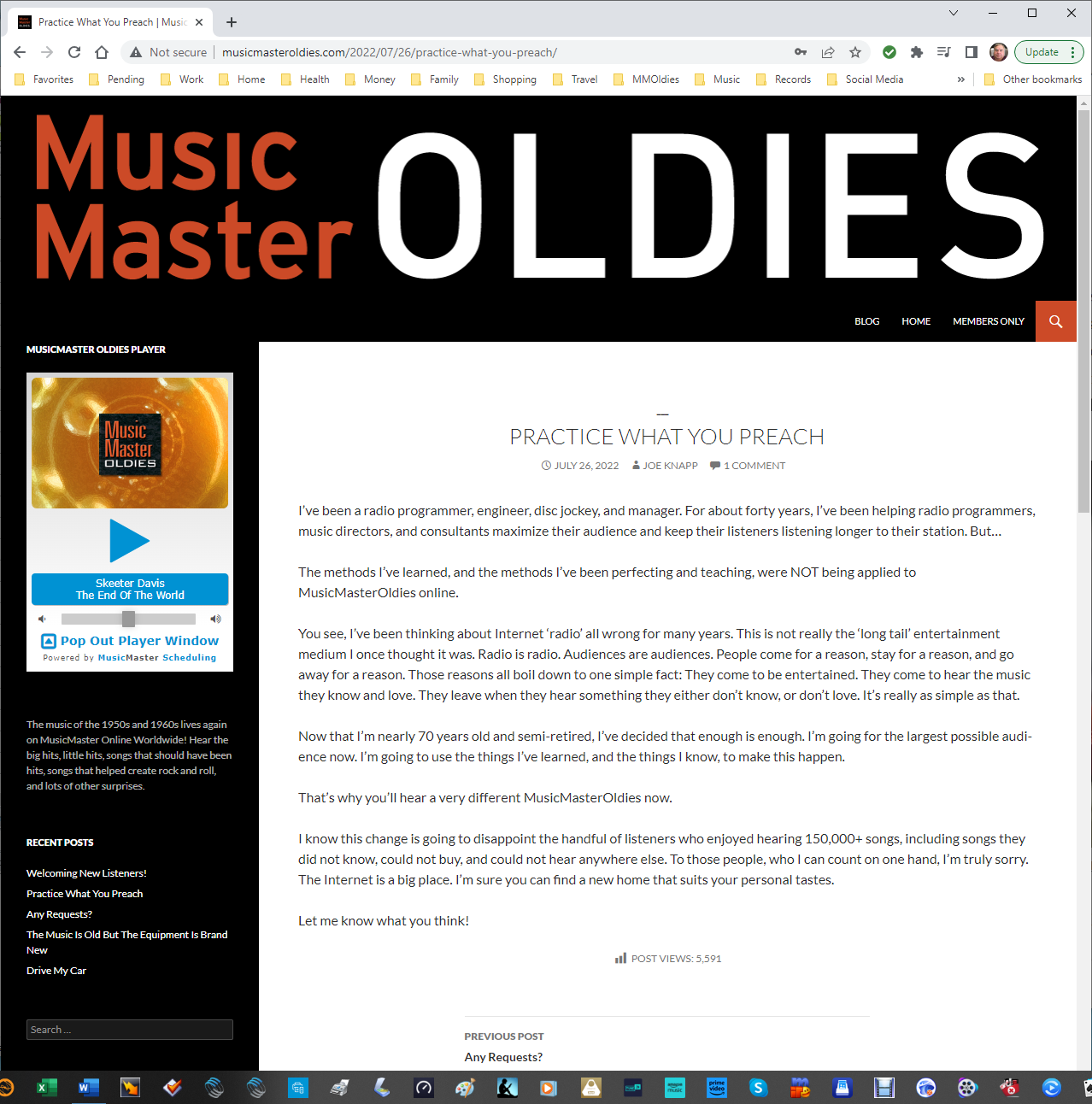
There are about 2,500 average listeners (and growing) and each of them listens for an average of one hour. The concept is based on a blend of philosophies. Terrestrial radio stations build cume by playing only the hits. Internet streams often go the “long tail” route and play everything under the sun. MusicMaster Oldies plays only the hits, but occasionally blends in one of those deeper cuts using imaging to turn them into special features.
Here’s how it works.
There are actually 591 songs in the active rotation, excluding songs by the Beatles and Elvis.
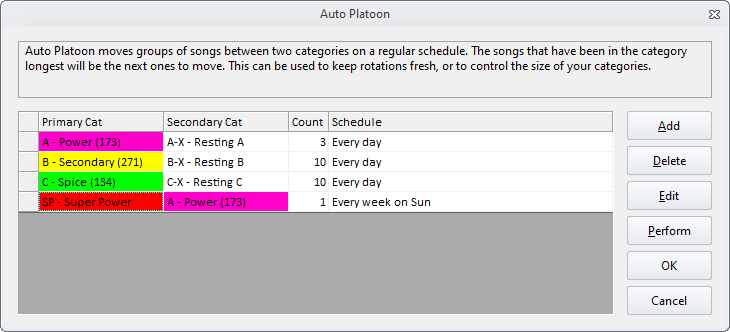
There are five songs in a Super Power category and you’ll hear one of them every hour. That’s five-hour rotation. These are specially selected “core” songs that are ultra-familiar and timeless music. Using Auto-Platooning, one of these songs is replaced every Sunday with the most rested song of the same type from the A-Power category. This keeps things tight, but fresh. It takes five weeks to replace all five songs, and just under two years to cycle all the “core” songs from A-Power into this SP-Super Power category.
The A-Power category has 173 cream-of-the-crop oldies from 1955-1973 and we play ten of them every hour. That’s a 17-hour turnover. 94 of these songs are marked as “core” and the other 83 are not. Every day, using Auto-Platooning, three of the non-core songs that have played the most are replaced with three from the AX – Resting A category that have rested the longest. Each non-core song rests for about three months before swinging back into action. The core songs never rest.
The B-Secondary category contains 274 songs and we play seven of them every hour. That’s a 1-day 15-hour turnover. Ten of the most played songs are swapped with ten from the BX – Resting B category that have been resting the longest. It takes about six months to cycle all these songs in and out of rest. You can barely notice these swaps because they happen very gradually!
The C-Spice category contains 134 songs, and we play one per hour. That’s a 5-day 14-hour turnover. Ten of these songs are also swapped with the most rested songs in the CX – Resting C category every day. It takes about six months for all of them to swap in and out of active rotation.

The three “rest” categories contain 237 (for A), 1324 (for B), and 1689 (for C) songs.
Here’s an example of songs you might hear in each category:
- A Core: Association – Along Comes Mary
- A Non-Core: Bee Gees – I’ve Gotta Get A Message To You
- B: Beach Boys – Good Vibrations
- C: Alice Cooper – Elected
The Beatles and Elvis have a ton of material and their familiarity and mass appeal make their songs somewhat interchangeable.
There are two Beatles and Elvis categories, Primary and Secondary, that alternate every hour. That’s a total of four categories. In each hour you’ll hear one from a Primary and one from a Secondary. There are 67 songs in the Beatles Primary (5-days 14-hours) and 274 songs in the Beatles Secondary (22-days 19-hours). There are 45 songs in the Elvis Primary (3-days 17-hours) and 239 songs in the Elvis Secondary (19-days 21-hours).
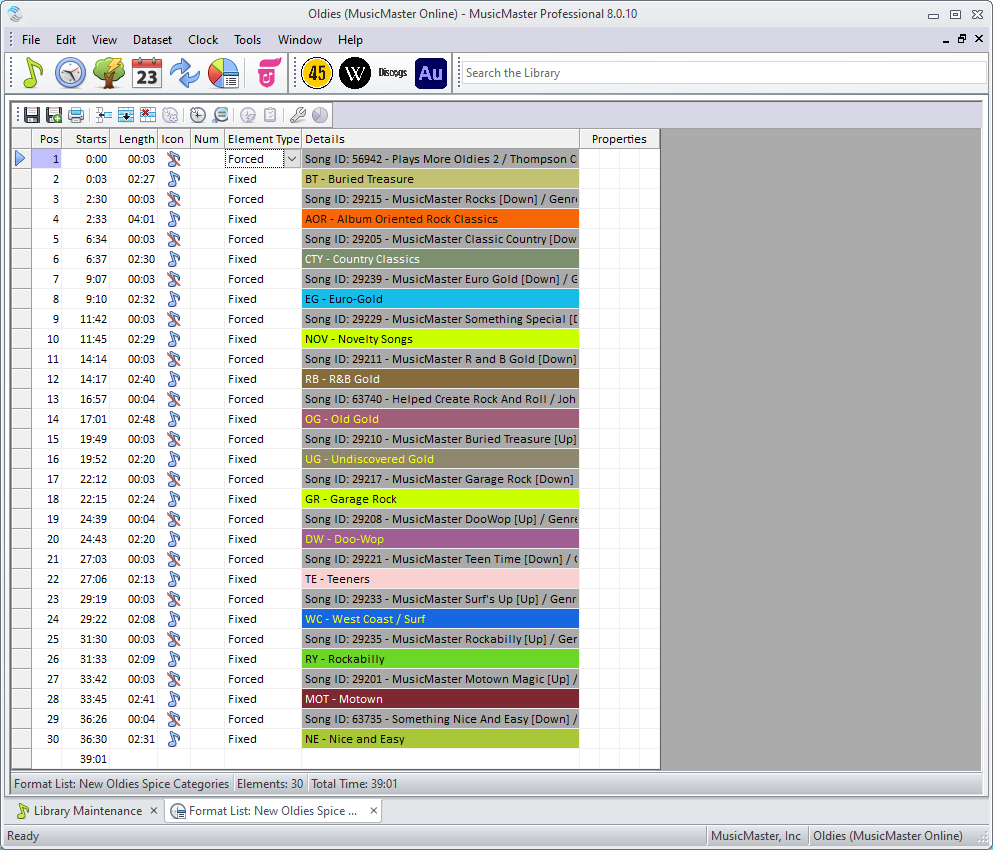
But where are the other 55,000 plus songs? Good question! They’re in separate categories that rotate with associated imaging in a Format List. Only one of these categories is called for every hour, and it takes 15 hours to hear just one song from each. Here are the names of these specialty categories and an example of what’s in them:
- Buried Treasure: Beach Boys – Wendy
- Undiscovered Gold: Bob Dylan – Highway 61 Revisited
- Euro-Gold: Adam Faith – Cheryl’s Going Home
- Doo-Wop: Herb Lance and the Classics – Blue Moon
- Garage Rock: Next Five – Little Black Egg
- Teeners: Ginny Arnell – I Wish I Knew What Dress To Wear
- West Coast-Surf: Lively Ones – Pipeline
- Rock Classics: Jimi Hendrix – Fire
- R&B Gold: Bobby Bland – Call On Me
- Motown: Marvin Gaye – Stubborn Kind Of Fellow
- Rockabilly: Carl Perkins – Pink Pedal Pushers
- Country Classics: George Jones – White Lightning
- Nice and Easy: Frank Sinatra – The Lady Is A Tramp
- Old Gold: Doris Day – A Bushel And A Peck
- Novelty Songs: Playmates – Beep Beep
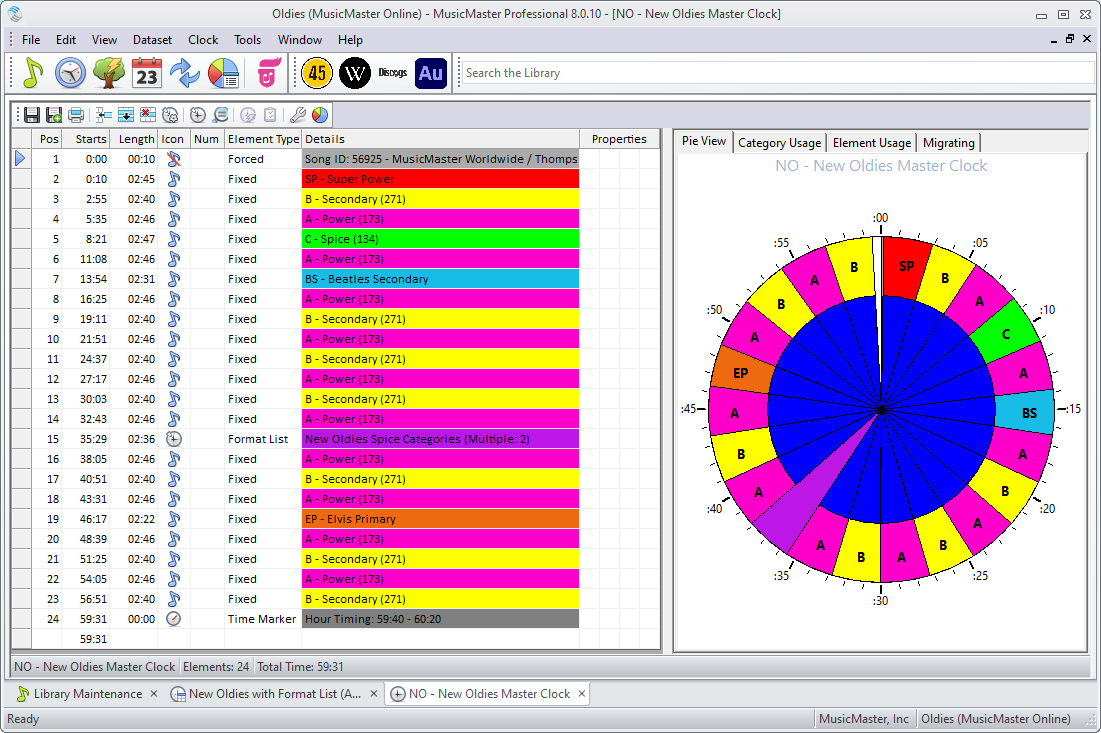
There are only two Format Clocks that alternate every other hour, just to flip-flop those Beatles and Elvis categories. Here’s what one of them looks like:
- Station ID
- SP – Super Power
- B – Secondary
- A – Power
- C – Spice
- A – Power
- BS – Beatles Secondary (or Power)
- A – Power
- B – Secondary
- A – Power
- B – Secondary
- A – Power
- B – Secondary
- A – Power
- Format List: New Oldies Spice Categories (Two elements, imaging first, then rotating through:)
- BT – Buried Treasure
- AOR – Rock Classics
- CTY – Country Classics
- EG – Euro-Gold
- NOV – Novelty Songs
- RB – R&B Gold
- OG – Old Gold
- UG – Undiscovered Gold
- GR – Garage Rock
- DW – Doo-Wop
- TE – Teeners
- WC – West Coast / Surf
- RY – Rockabilly
- MOT – Motown
- NE – Nice and Easy
- A – Power
- B – Secondary
- A – Power
- EP – Elvis Primary (or Secondary)
- A – Power
- B – Secondary
- A – Power
- B – Secondary
- Hour Timing: 59:40 – 60:20
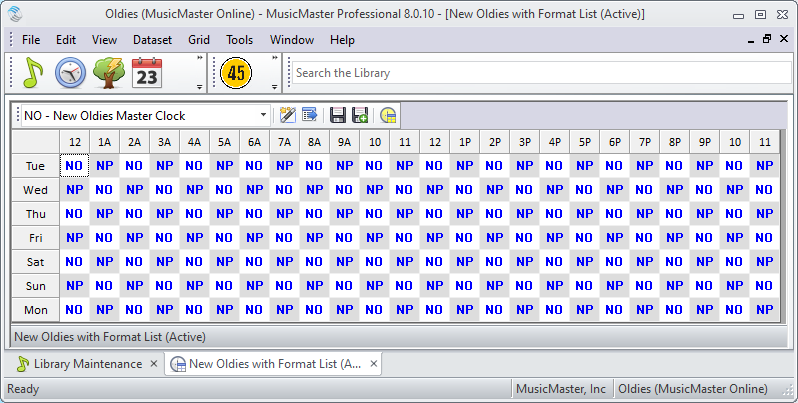
Each clock ends with an Hour Timing marker and an Hour Timing rule is applied to all categories. This keeps each hour within plus or minus 20 seconds of 60 minutes. I run Ready Check before exporting to make sure each day isn’t over or under scheduled. That never happens!
There are a few other tricks hidden under the hood. When I schedule music, I do one week at a time using ganged pass orders and scheduling just the SP-Super Power category first for the entire session. Then I run a second pass to schedule everything else, this time scheduling each hour before going on to the next hour. The A, B, and C categories are scheduled first, then all the others. There are never any unscheduled positions, and log editing is never required. It takes about an hour to schedule each week.
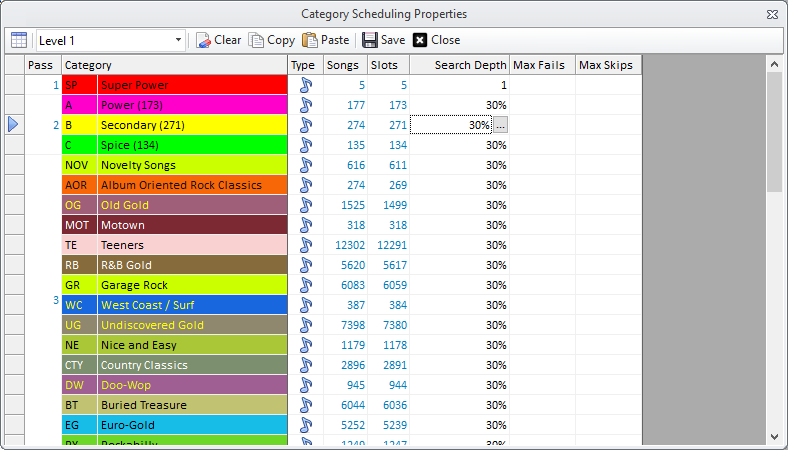
The rules are very simple because I lean on Optimum Goal Scheduling to do most of the heavy lifting.
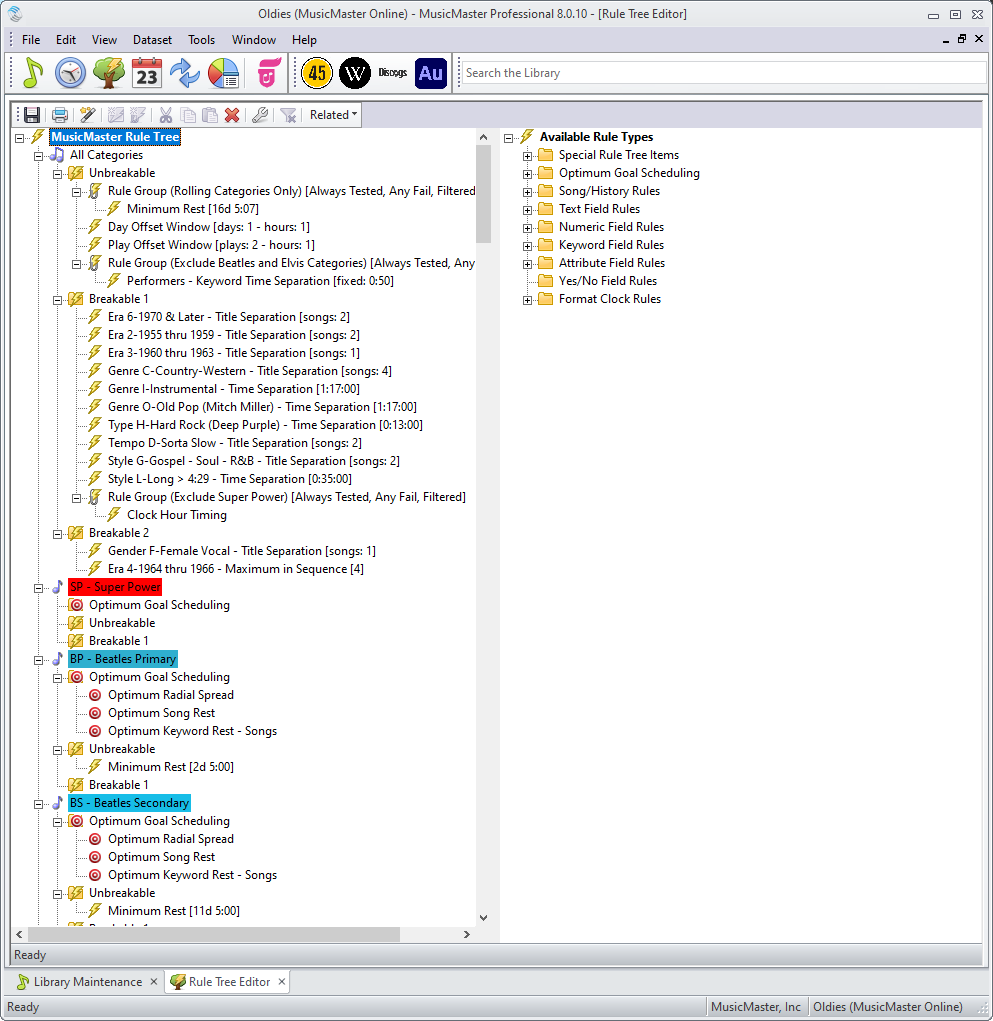

Of course, this same concept should work for just about any gold-based format if you dare to try it!
If anyone has any suggestions for me that might improve things a bit, please let me know. Just don’t suggest that I play fewer songs! This is still a work in progress as I add even more songs to the specialty categories and remove songs that just weren’t very good (probably payola adds).
Do you want Optimum Exposure? publicado em February 20th, 2023
by Chris Hulsether
What if I told you MusicMaster can help you spread out the airplay of your songs or artists throughout your day and cut down any perception you play the same songs in the same hour?
Optimum Goal Scheduling is a unique and exclusive concept in MusicMaster. We like to say it’s a tie breaker. When the Automatic Scheduler has two or more songs that clear all of the existing rules you set up, we call them “perfect songs”. A perfect song can be one that passes all of the breakable and unbreakable rules. Or, in the less common case where all the songs in the search depth fail at least one breakable rule, MusicMaster will apply the tie breaker to the songs that all failed the lowest priority breakable rule. (Songs that fail unbreakable rules are always skipped).
Optimum Goal Scheduling will score songs based on the various Goals you’ve applied and tell MusicMaster which perfect song it should choose. An example is choosing the song that meets the Goal for the most rested song among all the available perfect songs.
To learn more about Optimum Goals read this Blog: https://musicmaster.com/?p=1587 See this quick walkthrough video on how to set them up here: https://youtu.be/7ZmUchZsUow
I want to talk about Optimum Exposure Goals and what those goals will do for you when you activate them. The exposure goals will look at the available songs and choose the one that has been exposed or played the most in other hours, shifts, quarter hours, etc. before scheduling in the same spot. This gives you a better rotation of your category and helps prevent the perception that you play the same songs at the same time all the time. You will need to decide what exposure goal makes sense for your database.
To learn more about your Hour Exposure you can read this excellent Blog about Hour Exposure in your database here: https://musicmaster.com/?p=7494
Let’s look at the options:
This Goal will favor the song that has played in as many of the other 23 hours of the day as possible before playing again in the same hour. For example, let’s say the scheduler is trying to break the tie between two songs for a 2pm slot. Since the last time Song A played at 2pm, it has played in six other hours. Since the last time Song B played at 2pm, it has only played in two other hours. You’d want to give Song B a chance to play in more different hours before you play it again at 2pm. So Song A would be favored, because it’s played in more different hours before returning to the same hour and has the best Hour Exposure of the two.
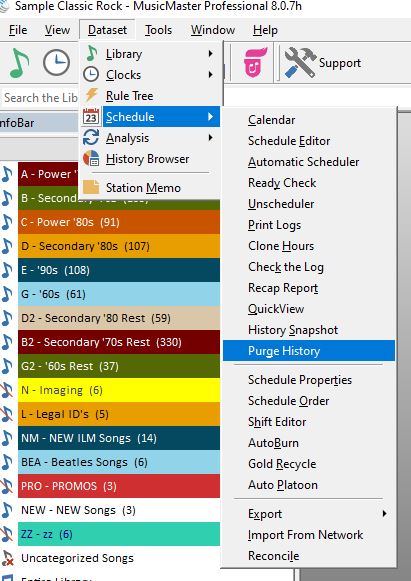
Note that it is important that your Purge History settings have enough plays to test. This Goal would need a minimum of 23 plays to work to its fullest.
To find Purge History go to Dataset/Schedule/Purge History
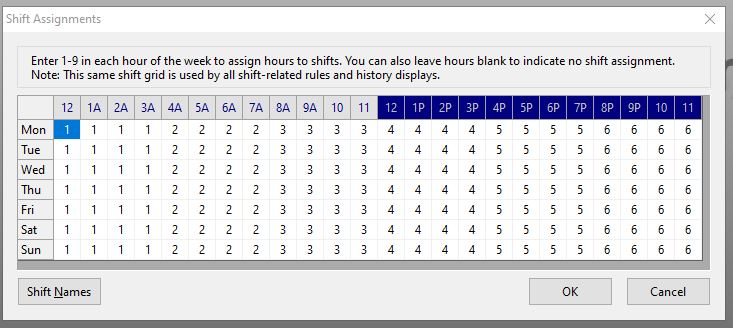
This Goal favors a song that has played in as many of your other shifts (as defined in the Shift Editor) as possible. To find your Shift Editor, go to Dataset/Schedule/Shift Editor.
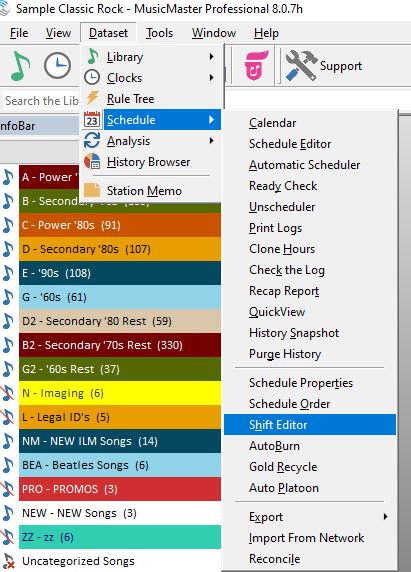
There, you can customize the shifts. You can match them with your on air shows or set them up as you define different parts of the day.
This Goal favors the song that has played in as many of the other quarter hours as possible before playing again in the same one. This only makes sense if the category you schedule the song in is located in different quarter hours in your clocks. If your D category is always at :18 after the hour and not anywhere else the clocks, then those songs in D will not get exposed to other quarter hours anyway.
This refers to the ideal rest of keywords such as Artist or Title Keywords. A good example would be favoring the song whose artist has rested closest to the ideal separation calculated for that artist.
This favors the keyword that has played in as many of the other 23 hours of the day as possible. This logic is similar to the Hour Exposure goal described above. Let’s say MusicMaster is scheduling a song at 2pm and it has a choice between a song with a Brittany Spears Artist Keyword and one with The Backstreet Boys Artist Keyword. The goal scheduler will see which keyword was used in more different hours first before playing again at 2pm. If the Brittany Keyword played in 4 different hours since it last played at 2pm, and The Backstreet Boys keyword played in 2 different hours since it last played at 2pm, the goal would choose Brittany. That way the Backstreet Boys would have a chance to be exposed to more different hours before being scheduled in the 2pm hour a second time.
Optimum Keyword Shift Exposure
The keyword that has played in as many of your other shifts as defined in the Shift Editor as possible. Using the Brittany/Backstreet Boys Artist Keyword example, If you have 6 different shifts set up throughout the the day, it’s 2pm, and Brittany’s keyword played in 3 different shifts and The Backstreet Boys’s keyword has only played in 2 different shifts since the last time Brittany and The Backstreet Boys were scheduled in this (2pm) shift, the goal will schedule Brittany because The Backstreet Boys hasn’t been exposed to more different shifts before scheduling in the same shift as your 2pm shift.
Optimum Keyword Qtr-Hour Exposure
This favors the keyword that has played in as many of the other quarter hours as possible. Let’s say at 2:05pm, Brittany’s keyword has been exposed to 3 different quarter hours before being considered again in that first quarter hour (00:00-15:00). The Backstreet Boys keyword has only been exposed in 2 different quarter hours before trying to schedule at 2:05pm, Brittany gets scheduled because her keyword has been exposed to more different quarter hours.
Optimum Radial Spread
Another related Goal worth mentioning here is Optimum Radial Spread. This goal actually takes both hour exposure and time-period exposure into account. The Shift Exposure goal only looks at one set of time periods; your assigned shifts. Radial Spread looks at a collapsing window of overlapping time periods, which can produce an even better result. Any song with a low score in either Hour Exposure or Shift Exposure will also have a low score in Radial Spread, so you can use this single Goal to combine those forces. For more on Optimum Radial Spread, check out this article: https://musicmaster.com/?p=3481.
As a final note, the Optimum Goal scheduling will never prevent a song from scheduling. That’s where your rules come into play first. You also want to be careful on how many Goals you set up, as it can slow down the automatic scheduler because it has more calculations to do when scheduling. However, you’ll make up some of that time in less time spent editing, since the log will be closer to the intuitive sound goals you have for your station.
If you have more questions, reach out to your Music Scheduling Consultant to assist you.
Optimum Rule Performance publicado em September 1st, 2014
By Paul Ziino
Open a Music Category in Library Maintenance and add in the field called “Performance.” (more…)
Filling in the Holes with Optimum Radial Spread publicado em April 14th, 2014
By Paul Ziino
Take a look at this History Graph.
 The rotations look pretty bad. Now compare that with this History Graph.
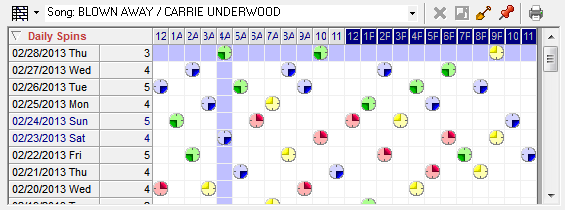 What a huge improvement! So now the question is, “what changed?”
How Optimum Goals Work publicado em December 31st, 2012
by Paul Ziino
We receive calls all the time asking for assistance with customers’ Rule Trees. A common question is “what’s the difference between rules and Optimum Goal Scheduling™?” Today, I will shed some light on that very topic. (more…)
MusicMaster TSL Booster Rules! publicado em November 14th, 2011
By Marianne Burkett
In the Programming department of any radio station, the final product flowing from the speakers is really all that matters. Compelling content, cool promotions, contests and stand out imaging, news and weather are important, but well-crafted music logs are really key to spiking the stations Time Spent Listening. (more…)